> ## Documentation Index
> Fetch the complete documentation index at: https://docs.tuturuuu.com/llms.txt
> Use this file to discover all available pages before exploring further.

# Part 5: Next.js

> The React framework for production - build full-stack web applications

<Info>
  ⏱️ **Duration**: 25 minutes | This is the core technology powering rmitnct.club!
</Info>

## What is Next.js?

Next.js is a **React framework** that gives you everything you need for production.

**If React is a sword, Next.js is the entire armory! ⚔️🛡️**

| What you get                  | Benefit                       |
| ----------------------------- | ----------------------------- |
| 🗂️ **File-based routing**    | Create a file = create a page |
| ⚡ **Server-side rendering**   | SEO-friendly, fast loads      |
| 🔄 **API routes**             | Backend in the same project   |
| 📦 **Built-in optimizations** | Images, fonts, scripts        |

<Note>
  **Fun Fact**: Next.js was created by **Vercel** and is used by TikTok, Nike, Notion, Anthropic, LG, and Tuturuuu. It powers both [rmitnct.club](https://rmitnct.club) and [Neo League 2025](https://nova.ai.vn/competitions/neo-league/prompt-the-future/about)!
</Note>

***

## Creating a Next.js Project

The fastest way to create a Next.js app:

```bash theme={null}
# Option 1: Using npx (Node.js)
npx create-next-app@latest my-app

# Option 2: Using bunx (Bun - faster!)
bunx create-next-app@latest my-app

# Navigate into the project
cd my-app

# Start the development server
bun dev   # or: npm run dev
```

When prompted, select these options for this workshop:

* ✅ TypeScript
* ✅ Tailwind CSS
* ✅ App Router
* ❌ src/ directory (optional)

<Tip>
  Open [http://localhost:3000](http://localhost:3000) to see your app!
</Tip>

<Card title="Next.js Templates" icon="rocket" href="https://vercel.com/templates/next.js">
  Browse 100+ ready-to-use templates for blogs, e-commerce, dashboards, and more!
</Card>

***

## Project Structure

```
my-app/
├── app/                  # 👈 Your pages and layouts
│   ├── layout.tsx        # Root layout (shared UI)
│   ├── page.tsx          # Home page (/)
│   └── globals.css       # Global styles
├── public/               # Static files (images, etc.)
├── package.json          # Dependencies
└── tailwind.config.ts    # Tailwind configuration
```

***

## File-Based Routing

In Next.js, **files become pages**. Create a file, get a route!

| File Path                  | URL                 |
| -------------------------- | ------------------- |
| `app/page.tsx`             | `/`                 |
| `app/about/page.tsx`       | `/about`            |
| `app/blog/page.tsx`        | `/blog`             |
| `app/blog/[slug]/page.tsx` | `/blog/hello-world` |

<img src="https://mintcdn.com/tuturuuu/LKHVwofYjE5PdgBy/images/workshops/nextjs/page.png?fit=max&auto=format&n=LKHVwofYjE5PdgBy&q=85&s=161e1e09826d2bc7f324e09c78cf9400" alt="How page.tsx creates routes" width="3200" height="564" data-path="images/workshops/nextjs/page.png" />

### Creating Your First Page

Create `app/about/page.tsx`:

```tsx theme={null}
export default function AboutPage() {
  return (
    <div className="p-8">
      <h1 className="text-3xl font-bold">About Us</h1>
      <p className="mt-4 text-gray-600">
        Welcome to our Next.js app!
      </p>
    </div>
  );
}
```

Now visit [http://localhost:3000/about](http://localhost:3000/about)!

***

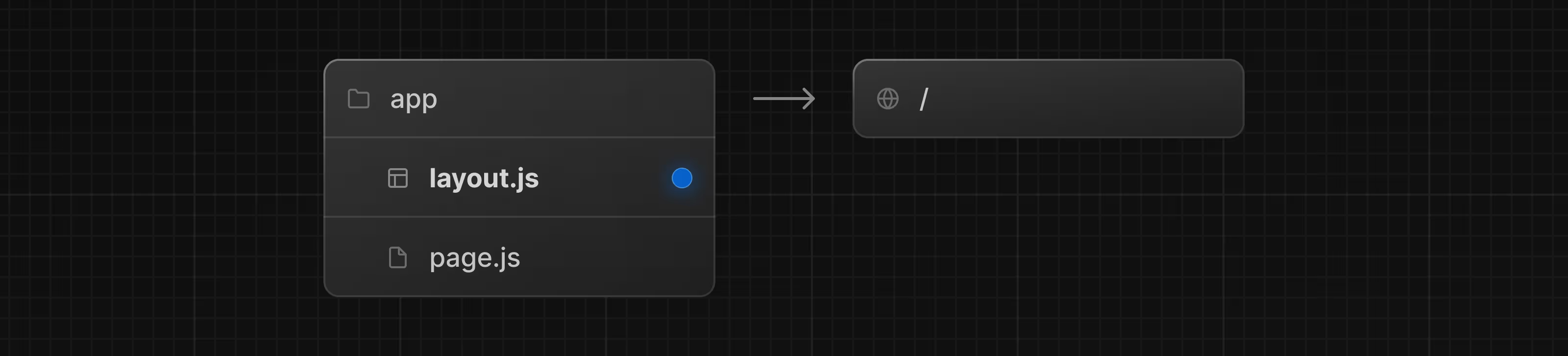
## Layouts

Layouts wrap pages with shared UI (navbars, footers, etc.).

### Root Layout (`app/layout.tsx`)

```tsx theme={null}
import './globals.css';

export default function RootLayout({
  children,
}: {
  children: React.ReactNode;
}) {
  return (
    <html lang="en">
      <body>
        {/* Navigation bar */}
        <nav className="bg-gray-900 text-white p-4">
          <div className="container mx-auto flex gap-6">
            <a href="/" className="font-bold">Home</a>
            <a href="/about">About</a>
            <a href="/blog">Blog</a>
          </div>
        </nav>

        {/* Page content */}
        <main>{children}</main>

        {/* Footer */}
        <footer className="bg-gray-100 p-4 text-center mt-8">
          © 2025 My App
        </footer>
      </body>
    </html>
  );
}
```

<img src="https://mintcdn.com/tuturuuu/LKHVwofYjE5PdgBy/images/workshops/nextjs/layout.png?fit=max&auto=format&n=LKHVwofYjE5PdgBy&q=85&s=0c226e7ecb86eb4a8f13bf28617953ee" alt="How layouts wrap pages" width="3200" height="726" data-path="images/workshops/nextjs/layout.png" />

***

## Server vs Client Components

Next.js has two types of components:

| Server Components             | Client Components               |
| ----------------------------- | ------------------------------- |
| Run on the server             | Run in the browser              |
| Can access databases directly | Can use `useState`, `useEffect` |
| Default in Next.js            | Add `'use client'` at top       |
| Great for static content      | Great for interactivity         |

### Server Component (Default)

```tsx theme={null}
// app/users/page.tsx
// This runs on the server!

async function getUsers() {
  const res = await fetch('https://api.example.com/users');
  return res.json();
}

export default async function UsersPage() {
  const users = await getUsers();

  return (
    <div className="p-8">
      <h1 className="text-2xl font-bold">Users</h1>
      <ul className="mt-4 space-y-2">
        {users.map((user: { id: number; name: string }) => (
          <li key={user.id}>{user.name}</li>
        ))}
      </ul>
    </div>
  );
}
```

### Client Component

```tsx theme={null}
'use client'; // 👈 This makes it a client component

import { useState } from 'react';

export default function Counter() {
  const [count, setCount] = useState(0);

  return (
    <button
      onClick={() => setCount(count + 1)}
      className="px-4 py-2 bg-blue-500 text-white rounded"
    >
      Count: {count}
    </button>
  );
}
```

<Warning>
  **Rule of Thumb**: Keep components as Server Components unless they need interactivity (`onClick`, `useState`, etc.).
</Warning>

***

## Navigation with Links

Use the `Link` component for navigation:

```tsx theme={null}
import Link from 'next/link';

export default function Navbar() {
  return (
    <nav className="flex gap-4">
      <Link href="/" className="hover:underline">
        Home
      </Link>
      <Link href="/about" className="hover:underline">
        About
      </Link>
      <Link href="/blog" className="hover:underline">
        Blog
      </Link>
    </nav>
  );
}
```

<Tip>
  **Why Link?** It enables client-side navigation without full page reloads - much faster!
</Tip>

***

## Dynamic Routes

Create pages with dynamic parameters:

### File: `app/blog/[slug]/page.tsx`

```tsx theme={null}
interface BlogPostProps {
  params: Promise<{ slug: string }>;
}

export default async function BlogPost({ params }: BlogPostProps) {
  const { slug } = await params;

  return (
    <div className="p-8">
      <h1 className="text-3xl font-bold">
        Blog Post: {slug}
      </h1>
      <p className="mt-4">
        Content for {slug}...
      </p>
    </div>
  );
}
```

Now `/blog/hello-world` will show "Blog Post: hello-world"!

***

## API Routes

Build your API in the same project:

### File: `app/api/hello/route.ts`

```typescript theme={null}
import { NextResponse } from 'next/server';

export async function GET() {
  return NextResponse.json({
    message: 'Hello from the API!',
    timestamp: new Date().toISOString(),
  });
}

export async function POST(request: Request) {
  const body = await request.json();

  return NextResponse.json({
    received: body,
    status: 'success',
  });
}
```

Now visit [http://localhost:3000/api/hello](http://localhost:3000/api/hello)!

***

## Building for Production

```bash theme={null}
# Build the app
bun run build

# Start production server
bun start
```

Or deploy to **Vercel** with zero configuration:

```bash theme={null}
# Install Vercel CLI
bun add -g vercel

# Deploy
vercel
```

***

## Complete Example: Blog

```tsx theme={null}
// app/page.tsx
import Link from 'next/link';

const posts = [
  { slug: 'getting-started', title: 'Getting Started with Next.js' },
  { slug: 'react-basics', title: 'React Basics for Beginners' },
  { slug: 'tailwind-tips', title: 'Tailwind CSS Tips and Tricks' },
];

export default function HomePage() {
  return (
    <div className="max-w-2xl mx-auto p-8">
      <h1 className="text-4xl font-bold mb-8">My Blog</h1>

      <div className="space-y-4">
        {posts.map((post) => (
          <Link
            key={post.slug}
            href={`/blog/${post.slug}`}
            className="block p-6 bg-white rounded-lg shadow hover:shadow-lg transition-shadow"
          >
            <h2 className="text-xl font-semibold">{post.title}</h2>
            <p className="text-gray-500 mt-1">Read more →</p>
          </Link>
        ))}
      </div>
    </div>
  );
}
```

***

## Next.js Cheat Sheet

| Feature          | Syntax                                              |
| ---------------- | --------------------------------------------------- |
| Create page      | `app/[path]/page.tsx`                               |
| Create layout    | `app/[path]/layout.tsx`                             |
| Client component | `'use client'` at top of file                       |
| Navigation       | `<Link href="/path">`                               |
| Dynamic route    | `app/blog/[slug]/page.tsx`                          |
| API route        | `app/api/[path]/route.ts`                           |
| Use params       | `{ params }: { params: Promise<{ slug: string }> }` |

***

## Learn More

<CardGroup cols={2}>
  <Card title="Next.js Docs" icon="book" href="https://nextjs.org/docs">
    Complete documentation
  </Card>

  <Card title="Next.js Learn" icon="graduation-cap" href="https://nextjs.org/learn">
    Free interactive course
  </Card>
</CardGroup>

***

**Next up**: [Vercel AI SDK →](/learn/workshops/nextjs-workshop/06-ai-sdk)