⏱️ Duration: 15 minutes | This section covers the absolute basics of web development.

What is a Website?

Every website you visit—from Netflix to TikTok to your university portal—is built with just three technologies: Think of a website like a human body:
TechnologyWhat it doesHuman analogy
🦴 HTMLStructure & contentSkeleton + organs
🎨 CSSAppearance & styleSkin, hair, clothes
🧠 JavaScriptBehavior & logicBrain + muscles
🤯 Did you know? The first website ever created is still online! Visit info.cern.ch—it was made in 1991 by Tim Berners-Lee. No CSS, no JavaScript, just pure HTML!

HTML: The Structure

HTML (HyperText Markup Language) defines the content and structure of web pages.

Your First HTML Page

<!DOCTYPE html>
<html>
  <head>
    <title>My First Page</title>
  </head>
  <body>
    <h1>Hello, World!</h1>
    <p>Welcome to web development!</p>
  </body>
</html>
Beginner Tip: Every HTML element has an opening tag <tag> and a closing tag </tag>. The content goes between them.

Common HTML Elements

ElementPurposeExample
<h1> to <h6>Headings<h1>Title</h1>
<p>Paragraph<p>Some text</p>
<a>Link<a href="url">Click me</a>
<img>Image<img src="photo.jpg" alt="Description">
<div>Container<div>Group of elements</div>
<button>Button<button>Click</button>

CSS: The Style

CSS (Cascading Style Sheets) controls how HTML elements look.

Adding Styles

<style>
  h1 {
    color: blue;
    font-size: 32px;
  }

  p {
    color: gray;
    line-height: 1.5;
  }
</style>

CSS Selectors

/* Select by element */
h1 { color: blue; }

/* Select by class */
.card { background: white; }

/* Select by ID */
#header { height: 60px; }
Beginner Tip: Use classes (.classname) for styles you’ll reuse. Use IDs (#idname) for unique elements.

The Box Model

Every HTML element is a box with 4 layers. Think of it like a package: The CSS Box Model
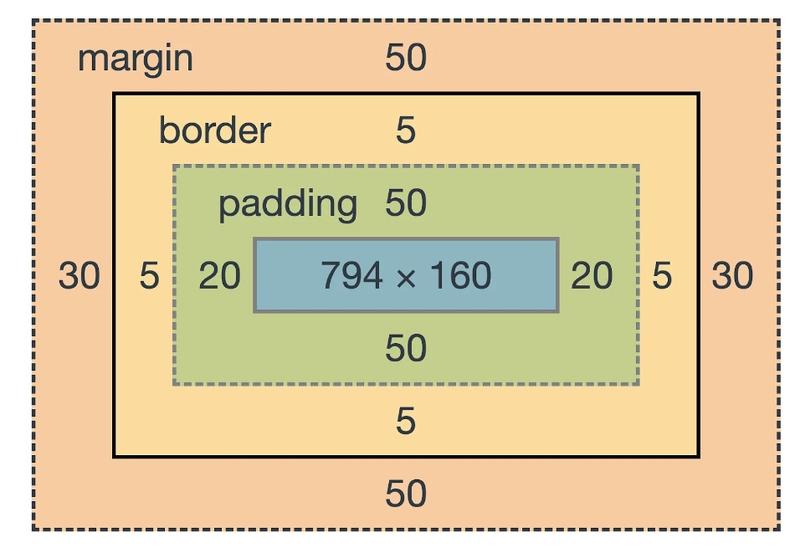
LayerWhat it isCSS Example
📝 ContentYour text, images, etc.width: 200px
🧸 PaddingSpace inside the borderpadding: 20px
🖼️ BorderThe visible edgeborder: 2px solid black
📦 MarginSpace outside the bordermargin: 10px
Real-world analogy:
  • 📝 Content = The gift inside the box
  • 🧸 Padding = Bubble wrap protecting the gift
  • 🖼️ Border = The cardboard box itself
  • 📦 Margin = Space between boxes on the shelf

JavaScript: The Behavior

JavaScript makes websites interactive.

Your First Script

<button onclick="sayHello()">Click Me!</button>

<script>
  function sayHello() {
    alert('Hello, World!');
  }
</script>

JavaScript Basics

// Variables
let name = 'Alice';
const age = 20;

// Functions
function greet(person) {
  return `Hello, ${person}!`;
}

// Calling a function
console.log(greet(name)); // "Hello, Alice!"
Beginner Tip: Use const for values that don’t change, and let for values that might change. Avoid using var.

DOM Manipulation

JavaScript can change HTML elements:
// Find an element
const heading = document.querySelector('h1');

// Change its content
heading.textContent = 'New Title!';

// Change its style
heading.style.color = 'red';

Putting It All Together

<!DOCTYPE html>
<html>
  <head>
    <title>My Interactive Page</title>
    <style>
      .highlight {
        background-color: yellow;
        padding: 10px;
      }
    </style>
  </head>
  <body>
    <h1>Welcome!</h1>
    <p id="message">Click the button below.</p>
    <button onclick="changeMessage()">Click Me</button>

    <script>
      function changeMessage() {
        const message = document.getElementById('message');
        message.textContent = 'You clicked the button!';
        message.classList.add('highlight');
      }
    </script>
  </body>
</html>

Key Takeaways

HTML = Structure

Defines what content appears on the page

CSS = Style

Controls how content looks

JS = Behavior

Makes content interactive

Learn More


Next up: Tailwind CSS →