

Overview
The mobile app now ships first-party workspace surfaces for:- Drive at
Routes.drive - CRM at
Routes.crm - Education at
Routes.education
ShellMiniNavfor mode or section switchingShellChromeActionsfor quick actions such as filters, create, sort, and view toggles- A compact overview with a small number of relevant metrics
- The v0.9.2 AppCardPalette gradient cards, consistent icon blocks, readable labels, and shared theme colors
404 responses.
Tasks, Calendar, and Finance are the default launcher modules. Meet, Mail, Chat,
and Notes join the existing opt-in apps in Settings → Experiments; all four are
off until the user enables them. The choice is cached on the device and restored
at launch. Turning a module on exposes it in Apps and its eligible Home card;
turning it off removes those launch surfaces. Mail still requires its account
access rule, and workspace visibility flags still apply. Deep links retain the
existing route access rules. Meet includes meeting search, scheduling, editing,
and deletion when enabled. Every launcher module has an English and Vietnamese
description.
Navigation preferences and recovery
Phones and tablets share a compact floating icon dock. Leaving a mini-app returns to its Home or Apps launch screen. Root screens remain mounted with hidden animations paused, preserving search and scroll state. The brand control opens the Apps screen within the normal shell, with compact search and arrange actions. Tapping a dock item glides the inner highlight to the new position without a button splash. During a hold or drag, the highlight follows the finger freely; it snaps to the selected item only on release. Reduced-motion settings shorten these transitions to an immediate state change. Switching between peer sections in any mini-app replaces the previous section in navigation history. Back follows the current context’s outer layer: a detail returns to its parent section, a peer section returns to the mini-app root, and the mini-app root returns to the Home or Apps launch screen. This also applies to deep links, so Back never visits a sibling section by accident. Personal Tasks boards are the Tasks entry surface. Their dock and Android system Back return to the root tab that launched Tasks, rather than the board directory that automatically opens the default board. Workspace board details retain their board-directory parent; task overlays return to their owning board. Apps is always available in the root dock. The Apps grid supports long-press reordering: nearby icons shift across rows during the drag, with a subtle motion cue, and the new order is saved on release. Tapping an app’s icon or label exits reorder and opens that app. Empty cell margins, row gaps, and unused grid space never open an app; tapping them exits reorder. Leaving Apps through any route also exits reorder, while preserving its search and scroll state. Long-press pickup and ordinary scrolling retain their existing gesture thresholds. App taps provide selection haptics. The list editor provides drag handles and visibility controls. Hiding an app requires confirmation. Hidden apps remain accessible at the bottom of Apps, separated from shown apps by a divider, and can be shown again without a confirmation. The editor places hidden experiments below Hidden Apps; enabled experiments appear in the regular shown order, while disabled or locally hidden experiments can be enabled or shown from Hidden Experiments. App order and hidden choices persist on the device. The editor disables Show when current account or workspace access would still prevent an experiment from appearing; access changes can make that control available later. Workspace permissions and experimental-app visibility still take precedence; a locally hidden app is only moved out of the shown launcher section, not disabled or removed from navigation. Home’s task, calendar, Finance, daily summary, and eligible Mail, Meet, and Notes cards can be reordered or hidden through the compact top-bar Customize action. Available cards are shown in their current order by default, and hidden cards remain in the editor for recovery. Unavailable modules do not appear as Home cards or editor choices; their saved layout preferences remain intact if access returns. The workspace picker and security prompts remain outside customization. The shell provides bottom scroll clearance, including for explicit-padding lists; pages must not add another dock inset. Downward scrolling hides the dock; reverse scrolling or idle restores it. Profile/Agenda reclaim hidden clearance; other pages keep it stable. Primary actions register withShellActionSpec.inDock.
ExtendedFab uses that registration inside the shell and remains standalone
elsewhere. Actions use icons on phones and labels on tablets. Do not duplicate
these actions in page-level floating buttons or top-bar actions.
Nova spins once when entering Assistant and remains static afterward. Loading
indicators continue animating, while pull-to-refresh uses an opaque circular
surface. Reduced-motion preferences disable spinning.
Calendar forms and event details use readable, blurred root-navigator sheets.
High-contrast mode uses an opaque surface. Failed event
edits or deletions restore the previous in-memory and cached list and expose the
server error. Verify the next reload as well as the immediate rollback.
Dock action handoffs retain presentation only, never callbacks or permission
state. Destination actions remain disabled until their mounted page registers
current handlers; missing destinations discard previews after a short handoff.
Long-press navigation supports freeform dragging between destinations, including
when the pointer leaves the dock. The pill stays under the pointer within the
capsule; crossing the nearest enabled tab gives selection feedback, and release
snaps to and selects that tab. The floating surface blurs content behind it,
uses one translucent outline, and contains the moving glow inside the capsule.
Pressing gently scales the island and smoothly brightens that internal glow,
which fades on release. Dock controls use accessibility labels without hover
tooltips. The Profile dock reserves its avatar space with a default placeholder,
shows a skeleton while an image downloads, and displays the cached image when
ready. Back from a peer navigation section exits to
the root tab that opened that context; back from a detail page returns to its
parent section. Shell search actions across Apps, Chat, Finance, Habits, Mail,
Meet, Notes, task boards, and Timer focus the top search input on entry. The
search icon, input, and close control share one vertical center; submitting an
empty or whitespace-only query closes search mode except in Apps, which keeps
its current search. Chat shows message matches
in the page, while task boards and Timer keep filtering their current lists.
The App, Workspace, and You dock destinations consolidate into one Settings
screen at /settings, with Workspace and You as nested navigation rows. App
preferences use compact grouped items, retaining two columns at widths of at
least 840dp. Root rows
show the current value and open nested choices; Finance visibility, haptics, and
Task board behavior never switch directly from a root tap. Opening, canceling,
dismissing, or pressing Back in a child does not write a preference. An explicit
choice is required, and an account/workspace switch cancels a pending editor,
including a switch away and back. This replaces the earlier inline-root-toggle
design. Existing theme, language, calendar, finance, and haptics sources remain
the owners; personal timezone still overrides workspace, then device timezone.
Timezone loading, unknown, retry, same-scope failure retention, and workspace
permission states stay visible. Permission reloads fail closed and stale results
cannot expose an editor or administrative destination.
Production native timezone reads use the Infrastructure Calendar gateway. Verified
Bearer sessions use the same hashed session trust key as server authentication;
header presence alone never grants a trusted bucket. A 429 response retains its
Retry-After cooldown across workspace changes for the same account. Settings
show the wait state and suppress repeated reads until that time; the previous
account’s cooldown and preferences do not apply to a different account. A successfully read personal or
workspace preference stays visible if the other read fails, while effective
timezone can remain unresolved; an independently loaded preference remains
editable after any 429 cooldown ends, while the failed read retains its retry
state.
Diagnosis must distinguish gateway status, preferences reads and native plugin
resolution; an Unknown label alone does not establish which failed.
Concurrent loads for the same account and workspace share one pending resolution.
The repository also shares pending personal reads across that account’s workspaces,
while workspace reads and all account data stay separate. Completed reads are not
cached by this mechanism; the next explicit refresh reads again. After a pending
read’s existing load deadline expires, a retry starts a new read; late transport
results cannot overwrite it. A resume refresh for the same scope does not
invalidate an in-flight preference save. Any 429 without
a positive parsed Retry-After uses a conservative 30-second cooldown. A failed
save keeps its requested value for an explicit retry after the cooldown; no timer
automatically retries reads or writes. Shared repository callers honor the account’s
cooldown, and late results cannot overwrite the current account or workspace.
timezone_load_coalescing_test.dart and timezone_gateway_retry_test.dart cover
these contracts, including HTTP-date retry headers and partial preference recovery.
The Infrastructure Calendar gateway forwards only bounded scalar rate-policy,
caller-class, window, limit, remaining, reset, block-reason and Turnstile challenge
headers plus Retry-After. Cookies, credentials, redirects and arbitrary upstream
debug headers are excluded; JSON responses remain private and uncached. Gateway
tests cover the allowlist and malformed values. These diagnostics help identify a
blocking layer; source checks do not identify the cause of a production 429.
Settings choice sheets scroll the heading and choices together in one bounded
viewport, so a long heading at large text sizes cannot consume the entire choice
area. Cancel stays outside that viewport. Other non-sliver dialog callers retain
their fixed heading by default; timezone choices keep their existing lazy slivers.
Mounted compact navigation coverage verifies visible choice space, real Finance
scrolling, dismissal without a write, and isolation from the underlying dock.
The app-wide Home/Apps dock is unchanged. Workspace is a child of Settings, so
Back returns to Settings; deeper workspace pages return to their parent. You opens
the existing Profile, preserving its navigation and account behavior. Legacy
Settings URLs and the Preferences redirect remain supported. Session, About, and
open-source licenses remain accessible. Root rows use existing theme tokens,
quiet shared borders, concise labels, muted values, and at least 48dp touch targets;
they grow with large text. Contextual Time Tracker, Mail, Meet, and Assistant
settings intentionally remain with their own app and permission context.
Settings tiles center a single title with the icon. For tiles with a value or
supporting line, the first title line aligns with the icon. Workspace settings
use the shell’s Workspace title and omit a second in-content heading. Settings
subpages likewise use the shell title once, without a repeated introduction.
Finance and Inventory read the workspace currency from the encrypted local
snapshot before their first frame. Inventory product and sales lists likewise
show cached rows and periods while background revalidation runs; a cold workspace
still fetches its first snapshot normally.
Notification Inbox and Archive actions share a bordered segmented control with
primary selected colors and accessibility selection state. Use segmentGroup
on related ShellActionSpec entries instead of unrelated highlighted icons.
Mobile notifications use App: item title as the title and put the event detail
or timing below it. This is the default for every module that sends mobile push,
for the mobile notification inbox, and for locally scheduled Task and Calendar
reminders. The app label follows the device language in the inbox and local
reminders; server-sent push currently uses English module names. An unknown
notification type uses Tuturuuu. Existing stored notification records keep
their original fields; display formatting does not change routing or read state.
Security approval pushes use Security while retaining their challenge data
and approval safeguards.
Mail owns folder, mailbox, and filter selectors through ShellMiniNav. Opening
a message replaces the shell title with its subject and reuses the dock back
action. Child composers and attachment previews suspend reader chrome. Background
read-state changes and revalidation do not display a refresh indicator; explicit
pull-to-refresh does. Reply-all and forwarding remain in the message actions sheet.
Chat bubbles expose copy through long press or secondary click. Markdown in these
bubbles must not install a competing native text-selection long-press recognizer.
Other standalone markdown views remain selectable.
Responsive Loading And Cache Verification
Device task and calendar reminders
Settings → Notifications & interaction → Reminders controls task and calendar alerts separately. Both default on, with selectable 3-day, 1-day, 12-hour, 3-hour, and 1-hour lead times. The app refreshes the existing user/workspace-scoped task and calendar caches after sign-in and when it resumes after 15 minutes. It then schedules the nearest 60 future device alerts, replacing outdated entries and cancelling them on sign-out. An all-day event uses 9 a.m. local time as its reminder anchor. Android boot/package-replacement receivers restore pending alarms after a restart or update. Calendar alerts use a localized timing title (for example, “Calendar: In 3 days”) and the event name as the description, including for all-day events. Tapping one opens that event in the mobile Calendar detail sheet. If the event was removed or cannot be loaded, the app returns to Calendar and shows a brief message. This behavior applies to device-scheduled reminders on iOS and Android; task reminders keep their existing title and description. The Reminders page shows the last successful fetch, the number of alerts still pending in the operating system, the next scheduled alert, notification permission, and a manual refresh action. A scheduled count is local state, not proof that the device displayed an alert. If the app remains suspended, new items created on another device cannot enter the local schedule until the next app refresh. The deployed web cron checks watched task deadlines every five minutes across workspaces, queries only the active reminder windows, and creates notifications through each user’s channel preferences, including mobile push. Workspace task reminder settings can change or disable the lead times; without an override, the server uses the five device defaults. Its receipt includes the due date, so a rescheduled task is eligible again. Calendar event reminders still depend on the device schedule until the server calendar reminder flow is shipped. Verify this flow on physical iOS and Android devices with the app closed, notifications enabled and disabled, account switching, changed due dates, and completed tasks. Root tabs initialize on their first visit and retain their state afterward. Hidden tabs stop ticking animations. Page content and navigation no longer wait for staggered entrance animations. Opening Apps does not prefetch every product. Screen routes use subtle fade and horizontal motion on Android and desktop; iOS retains the native swipe-back transition. Reduced-motion settings skip the custom transition. The floating shell tabs animate their content in place. Home shows Finance wallets and recent Notes alongside its existing summary cards when those modules are available to the current account and workspace. Both cards use scoped snapshots while refreshing, and clear their displayed rows when the account or workspace changes. They link into their corresponding mobile screens. The Notes link picker uses scoped snapshots and the local entity index for Tasks, Calendar events, Finance wallets, Notes, and Meet rooms. It overlays queued edits and marks unsynchronized options. Reopening a cached category shows its rows while revalidating. A new category without any local entities still waits for its first response.CacheStore shares initialization and concurrent fetches for the same scoped key.
Prefetch returns stored snapshots immediately and starts background
revalidation, even past their expiry window. Explicit refresh waits for the network.
On startup, the encrypted
store consolidates legacy aliases into canonical scoped keys and retains the newest
snapshot for each identity. Pending offline mutations remain separate and intact.
An encrypted entity index now materializes rows with stable IDs from scoped
snapshots. It is rebuilt automatically from existing snapshots when its schema
version is absent, updates alongside new snapshots, and removes rows when their
source is cleared or evicted. Local queries require a user ID, workspace scope,
and namespace; they can overlay the matching queued edits without a network
call. Storage limits include the indexed entity payloads. This is the database
foundation for module read adapters, rather than evidence that every module is
already locally readable or writable.
Mail keeps an explicit request path for authorization cleanup on 401/403.
Meet now returns the scoped meeting snapshot immediately, refreshes in the
background, and purges denied data if the refresh returns 401/403.
Meet room costs, ended-meeting reviews, and assistant review details use scoped
snapshots. Assistant review decisions queue with revision conflicts surfaced for
manual review; a queued review card uses the pending frame. Live call tokens and
assistant generation still require a connection.
Pending Notes, Mail, Finance, Calendar, and Inventory product edits are stored in the account-scoped encrypted
mutation queue and replayed in order per module and workspace on reconnect. Every
authenticated replay request remains bound to the queued edit’s account, including
after asynchronous local-ID resolution and between requests in a multi-step
operation. Switching accounts pauses that edit in the queue; it cannot send with
the new account’s credentials. API account and offline-sync regression tests cover
this boundary. A
conflict holds dependent edits in that scope while other modules continue. A queued item uses a dashed
border and lower opacity until the server confirms it; conflicts and failed
writes remain visible in Settings > Offline > Offline changes for retry or removal.
Removing a queued change requires confirmation and does not undo a write that
may already have reached the server. A user-initiated retry gives a completion
haptic only when that specific outbox entry is removed after replay. Finance
creates and transfers, Mail sends and attachments, and Notes creates use stable
client IDs so replay can recognize a prior successful write. The queue checks
structured local ID references across modules and holds a dependent edit until
its source create has synced. The replica stores account/workspace-scoped ID
mappings across module namespaces, so a queued Note mention can resolve a Task
created offline. Operational actions that require a live server calculation or
fresh authentication remain explicit online paths.
Calendar event lists use scoped snapshots and overlay pending edits. An uncertain
Calendar create stays in manual review because it may have already reached an
external calendar provider.
Connected Calendar accounts and visibility settings also read encrypted snapshots
while revalidating. Offline disconnects and visibility toggles remain queued and
visibly marked until confirmed. Provider OAuth URLs still require a live request.
Inventory product lists overlay queued creates and updates on their cached
catalog; an uncertain product create also requires manual review.
Inventory setup choices (owners, manufacturers, categories, units, and
warehouses) use the same queue. Their local chips carry the dashed pending
frame and stay available after an offline refresh. A failed authorization
refresh removes the protected snapshot.
Storefronts and their listings use the same scoped read and write path. A newly
created offline storefront keeps a local ID so queued listings can reference it;
replay maps that ID to the server storefront before sending dependent edits.
Queued storefront and listing cards retain the dashed, dimmed treatment.
Education course, quiz, and flashcard edits and basic CRM user and feedback
edits use the same encrypted queue. Education course, quiz-set, quiz, flashcard,
and attempt reads and CRM user, group, feedback, and audit reads use scoped
snapshots while revalidating. Education authored cards and CRM user and feedback
cards show queued edits with the pending treatment. Education attempts are
read-only in the mobile app and use scoped snapshots.
CRM user merges and bulk imports enter the outbox as ordered commands. A queued
merge marks its source user pending; a bulk import reports queued instead of
claiming users were imported. User avatars stage encrypted bytes, obtain a new
upload token at replay, and map their local placeholder to the returned URL
before the dependent user edit runs. Duplicate detection remains a live server
calculation and does not represent a local edit.
Workspace secret create, edit, and delete queue in the encrypted settings
outbox; pending secret cards are dimmed and dashed. A newly created secret is
matched to its server ID after replay before dependent edits run. Ambiguous
secret writes stop for manual review. Storage migration remains an online
operational command and is never represented as a completed offline change.
Documents lists and details use scoped snapshots. Document create, update, and
delete enter the encrypted outbox when offline, and list rows expose their
pending state. A newly created offline document uses a local ID for navigation;
its create must finish syncing before edits to that document can be replayed
against a server ID. The outbox persists a scoped local-to-server ID mapping
when the create response supplies an ID and rewrites dependent queued paths and
structured payload fields before replay.
Drive directory and analytics, CMS collections and entries, and Habit tracker
lists and details also read scoped snapshots while revalidating. CMS collection
and entry CRUD uses the outbox and marks pending tiles. CMS entries targeting a
locally created collection use the persisted ID mapping during replay. Drive
folder create, rename, folder and file delete use path-scoped
queued edits with pending rows. Drive uploads also queue encrypted file bytes;
replay requests a fresh signed URL, uploads the bytes, and finalizes the file.
An uncertain upload remains in manual review to avoid overwriting a file twice.
Habit trackers, entries, and streak actions also queue edits, with pending
cards and activity rows. Create responses that omit a server ID still need
dedicated replay support. Habits repository reads capture the original account
before API/cache and pending-edit awaits; only that account’s queued records are
overlaid. A member detail includes queued entries only for the selected target
member. Writes require authentication before queue admission and invalidate the
owning account/workspace. habit_tracker_actor_scope_test.dart verifies owner
filtering, delayed reads, anonymous transitions, and member-target isolation.
The native Habits screen recreates its cubit when the authenticated account or
workspace changes. Screen snapshot keys and pending asynchronous publication use
the initiating actor; closed or departed sessions cannot publish late list or
mutation responses, and workspace switches reset mutation busy state and quick-log
drafts. Authentication cache cleanup also invalidates work when the same account
signs out and back in. Forms and details remove only their owned route on scope
departure, including a route covered by another modal. These rules are covered by
habits_actor_lifetime_test.dart, real encrypted storage in
habits_cache_lifetime_test.dart, habits_host_scope_test.dart, and
habits_owned_overlay_test.dart. A definitive 401/403 from a native Habits
list, detail, or activity request clears visible rows and blocks every secondary
snapshot query variant for that account/workspace. A separate durable denial
marker prevents reopening private history when snapshot deletion fails. Purges
and subsequent publication are serialized; only a fresh authorized list saved
successfully can remove the marker. Draft edits and queued mutations cannot
reauthorize it. MFA/verification challenges and temporary transport failures keep
the last authorized screen snapshot. The native cubit requests fresh repository
responses while supplying its own stale snapshot, so a lower-level cached response
cannot masquerade as renewed authorization. Other repository callers retain the
default read-through contract. habits_snapshot_access_test.dart covers durable
revocation, storage failures, fresh-read provenance, ordered recovery, private
member removal, and actor/workspace isolation.
Habits overview search is hosted by the persistent shell dock; closing search or
leaving the section clears its query. A tracker detail sheet opens immediately
while its scoped request loads. Reopened details revalidate in the background
while keeping their last authorized snapshot; cold loads and background refreshes
reuse an already-running request for that tracker. Duplicate taps cannot open stacked detail sheets. The scope-owned route
still closes on account/workspace departure. These native-only presentation rules
are covered by habits_page_search_test.dart and
habits_page_personal_detail_test.dart; the API remains an unpaginated list.
Meet meeting create, edit, and delete also queue offline with a pending list
treatment. Assistant model favorites and name changes now queue offline and
overlay pending values on their scoped cached reads. Live room access,
realtime tokens, and assistant generation remain network-dependent and must not
be represented as queued calls.
Task summaries, board lists, and board task pages read scoped snapshots while
revalidating. Core task create, edit, description, delete and restore, plus
board create and lifecycle edits, enter the outbox offline. Task and board
cards expose pending status. Label, project, and initiative lists revalidate
from scoped snapshots. Their
create, edit, and delete actions queue offline with pending cards. Task
relationships and task/project/initiative links queue as scoped edits. Bulk
task actions queue as one ordered edit with every affected card marked pending;
the bulk action reports a queued result without claiming server success.
Partial bulk replay stays in manual conflict review so successful tasks are not
silently retried with failed ones.
Board task create, edit, and move and board list create, edit, and reorder
also queue offline. Their list reads overlay pending edits; task cards and
list headers distinguish unsynchronized rows. Project updates read scoped
snapshots and queue create, edit, and delete with pending cards.
Board estimation settings also queue offline, overlay pending choices on the
cached board list, and mark the board tile until the edit is acknowledged.
Task description images stage encrypted bytes and request a fresh signed upload
URL during replay. Their unique local image markers are replaced only in queued
task description fields after upload; arbitrary prose is never rewritten. An
ambiguous upload remains in manual review before its dependent description edit.
Converting a Note checklist item to a Task uses the cached board/list reads and
Tasks outbox. The Note mention carries the local Task ID until replay maps it;
tapping an unsynced mention shows its queued state, and a synced mention opens
the resolved Task.
Chat conversation and message lists also return scoped snapshots while
revalidating. Conversation create, edit, and delete and user message sends enter
the encrypted outbox offline. A queued message appears immediately with a
dimmed dashed frame. Each send carries a stable client request ID so replay can
use the server’s idempotency check. Message edit, delete, read acknowledgment,
reactions, AI settings, and friend requests also queue offline. Attachments
stage encrypted bytes in the outbox, request a fresh signed URL on replay,
and rewrite dependent queued message paths after upload. An ambiguous upload
remains in manual review. Assistant generation remains network-dependent.
Notification feeds and unread counts also return scoped snapshots while
revalidating. Read state, metadata, viewed Mail thread archiving, and workspace
invite decisions queue offline. Pending read state is applied to the feed and
unsynchronized notification tiles use the dashed treatment.
Profile’s former preferences snapshot migrates into the encrypted account-scoped
replica on first read. The visible cached profile stays in place during each
refresh. Profile text edits and activity sharing queue offline; identity and
sharing controls show the pending treatment until acknowledged.
Avatar changes stage encrypted image bytes offline and request a fresh signed
upload URL on replay. A lost upload connection remains reviewable because the
server may already have accepted the image.
Workspace member, role, and invite-link settings use scoped snapshots and queue
edits while offline. Permission and invitation changes only become effective
after server acknowledgment; uncertain writes require review in Offline changes.
Workspace selection migrates from preferences into the encrypted replica, and a
cached workspace list always triggers revalidation when loaded. Creation limits
and module visibility metadata use the same read behavior. Finance exchange
rates, wallet details, transaction pages, and stats retain snapshots during
refresh, including the initial Finance screen load.
Workspace creation, name and default changes, and avatar edits queue offline.
New workspaces receive local IDs; replay maps those IDs before dependent edits.
Workspace avatar bytes remain encrypted in the outbox until a fresh signed URL
is requested. An uncertain creation or upload requires review to avoid a
duplicate workspace or avatar operation.
Timer sessions, history, categories, goals, requests, and summaries use scoped
snapshots while revalidating. The native Timer root captures its actor lifetime,
workspace, and request generation before loading. Account and workspace changes
invalidate old cache, network, and disk publications; a same-account return after
logout cannot revive the old request. Current-scope snapshots remain visible
while revalidating. Deferred repository and encrypted-storage regressions in
time_tracker_scope_test.dart cover these boundaries. Session start, stop, pause, resume, edit, missed
entry creation, and deletion queue offline, with dimmed dashed session cards.
Timer category creation, goal create, edit, and delete, request create and edit,
approval changes, comments, and threshold updates queue too. Request images
stage encrypted bytes, obtain fresh signed URLs during replay, then submit the
request with the resulting storage paths. Category, goal, request, and comment
cards show pending sync state. Local ID reconciliation supports edits made
before a create syncs; ambiguous sends remain in manual review. Running session state applies
queued lifecycle edits over the latest snapshot.
Finance category and tag lists also read scoped snapshots while revalidating;
their create, edit, and delete actions queue offline, and queued cards use the
dimmed dashed treatment. An uncertain transaction
update or delete enters manual review rather than automatic replay. Once a
transaction or transfer update is acknowledged, failure to refresh its detail
does not invite another money write.
Wallet checkpoint create, batch create, edit, delete, and reconciliation also
enter the finance outbox. The timeline overlays queued checkpoints while
keeping server-confirmed latest balances and interval calculations separate;
pending rows have the dashed treatment. Finance feedback says queued or needs
review when the write has not been acknowledged. Transaction attachments stage
encrypted bytes, request a new signed upload URL on replay, and show queued
state until delivery. An ambiguous money write or upload waits for manual review.
Inventory sales-period create and edit, sale create and edit, period assignment,
and delete queue offline. Sales lists overlay local edits; pending sale cards do
not show an unconfirmed amount. Their local details remain readable and editable. Invoice replay maps
its returned ID before sending a queued period assignment. Pending period and
sale cards use the dashed treatment, and unknown outcomes require manual review.
Invalidation and logout prevent older
in-flight requests from writing back into the cache. Keys must include user,
workspace, and all query filters.
Offline refresh consistency (cache-backed reads in all mobile products): a
two-phase read and its
nested repository reads share one refresh cycle. Reconnect first revalidates
visited resources, then visible projections reuse those completed reads. A later
explicit refresh starts a new cycle; scope changes and invalidation fence earlier
results. Explicit setup/catalog refreshes report transport failure; ordinary
offline reads retain confirmed rows and project queued edits. Checkout coalesces overlapping quote reads, while an explicit retry after
a settled request remains available. Removing one retained resource invalidates
only the corresponding downloaded product for its actor and workspace.
Each product must retain its shared permission snapshot before download readiness
is accepted; Finance also requires retained exchange rates. Eviction of either
dependency prevents readiness even when the product’s own catalog is complete.
Snapshot replacement, source indexes, authoritative download reconciliation,
and pressure eviction share one resource ordering boundary. An encrypted durable
journal restores the previous completed snapshot after interrupted publication
or cleanup. A persisted clear intent takes priority over rollback on restart;
logout, actor changes and explicit invalidation must not resurrect old data.
Resource-only clearing preserves unsynchronized outbox edits and local-ID mapping
provenance. Replica extraction accepts known response envelopes, not arbitrary
nested relation or metadata objects. Canonical domain fields survive sparse
responses, while explicit clearing values stay cleared. Regression evidence:
cache_store_publication_test.dart and cache_replica_policy_test.dart.
Connectivity fallback is restricted to typed transport failures (socket, timeout,
or HTTP-client transport errors). Invalid JSON, unexpected response shapes,
oversized bodies, and failed session refreshes remain visible failures rather
than presenting a cached response as a successful refresh. Download pacing wait
is outside the actual HTTP request timeout. Search patterns are compiled once per
retained search pattern rather than once per candidate row.
Mutation queue admission uses the same typed transport rule. The explicit
OFFLINE_CONTRACT_UNAVAILABLE exception is admitted only for replay-safe writes;
session, malformed-response, and unknown failures never become pending writes.
Reopened sale details immediately project queued sales-period assignments,
including explicit removal, over the scoped confirmed snapshot. They retain
queued status and local IDs until acknowledgment; pending IDs never become server
mutation targets.
Definitive not-found responses, including a locally queued deletion, clear
retained sale details and mutation controls. Transient refresh failures retain
the authorized snapshot. Regression evidence: offline_mutation_admission_test.dart,
cache_revalidation_test.dart,
offline_download_manifest_test.dart, offline_preparation_coordinator_test.dart,
api_client_transport_failure_test.dart, inventory_sale_period_projection_test.dart,
inventory_sale_detail_refresh_test.dart, and season_pricing_controller_test.dart
under apps/mobile/test.
Failed disk writes do not hide successful network responses. Mail and Meet retain
the original authorization error and disable their cache if denied-data cleanup fails.
Keys longer than Hive’s 255-byte UTF-8 limit use a SHA-256 digest of the complete
scoped identity. Keep short keys stable, and test persistence/reopening with real
UUIDs and long search filters; short mock IDs can hide storage failures.
Mail list snapshots use the existing encrypted Hive store, with a one-minute
freshness window and a seven-day retention window. Cached rows appear while a
background refresh runs, including after their freshness window. A background
authorization denial revokes the affected workspace snapshot, clears the inbox,
and closes an open reader. Pull-to-refresh forces a network read, and successful mutations
invalidate the workspace’s Mail variants. Thread details use the same scoped
cache; permissions and individual messages (including editable drafts) are
fetched from the server. General attachment bytes, credentials, and active compose buffers are
not cached. Authorization failures discard the displayed list. Search waits 300ms
after typing, and list rows are built lazily. Folder metadata loads independently
so it cannot hold up the inbox.
Small inline images keep an encrypted thread-scoped copy. A cached image renders
immediately while one shared background request refreshes it; a denied image
request revokes the affected Mail workspace and clears its thread media.
Inventory can synchronously restore an unexpired user/workspace-scoped snapshot
before currency and permission requests finish. Editing remains disabled until
current permissions are confirmed. A denied request removes displayed content;
cached data must never grant mutation permissions.
Tablet layouts and shared controls
Use the available window width, including split-screen windows, when choosing columns. Home uses a full-width workspace selector and independently flowing card columns; the Apps hub uses content-sized rows so larger text can grow. Drive and CMS allow their grids to use the wider workspace. Kanban and timeline are work surfaces: do not wrap them in the reading-column width constraint. Tablet Kanban fills the available height and puts dock clearance inside each scrolling task list. It shows multiple independently scrolling lists; compact windows keep the swipe-between-lists interaction. Leave room for the shell dock and task actions. The shell’s Apps button opens a searchable picker using the same module visibility rules and descriptions as the hub. Primary top-bar actions remain visible; extra actions use the overflow menu. Tablets can display more actions. Register Mail workspace actions only while its nested workspace route is current, so a reader or composer cannot leave stale workspace actions active. Mail controls scroll with the message list, and formatted messages render inline in an isolated native WebView. JavaScript, file access, forms, and browser-session sharing remain disabled. Remote images require an explicit action. Its shared document builder sanitizes the original body HTML off the UI thread, preserves newsletter styles and email tables, and uses the web reader’s typography and overflow rules. Do not force every table into fixed equal-width columns. CID images load through the authenticated attachment API, limited to raster images, 12 requests and 8 MiB retained bytes per message. The WebView receives only prepared image data, never API credentials. Large attachments remain available through the attachment actions. Meet uses cached, account/workspace/query-scoped pages, explicit refresh, and mutation invalidation. Workspace changes must invalidate pending UI requests even when the new workspace is absent. A 401/403 clears the cached and displayed data. The native Meet room keeps the shell’s top bar and places its leave/back control in the room content, so the route title and dock follow the rest of the app. Verify at least 768×1024, 1024×768, and 1366×1024, plus a compact split window, larger text, and an open keyboard. Check dock height and taps, multiple Kanban columns, horizontal and vertical scrolling, task-detail return position, picker filtering, and the last visible row above the dock. Widget checks supplement authenticated simulator checks; native email rendering requires device verification. When changing this behavior, verify cold launch, returning to a visited tab, pull-to-refresh, slow/failed requests, rapid search changes, and switching accounts or workspaces. Run the focused cache, Mail workspace, lazy tab, and shell back navigation tests, followed bybun check:mobile. Use an iOS simulator to inspect
light/dark appearance, larger text, keyboard interaction, and narrow layouts.
Time Tracking and CRM user mobile calls stay on the live platform origin: Track and Contacts require
app-session credentials, while mobile currently uses Supabase Bearer sessions.
Do not move those paths to their satellites until mobile supports that authentication contract.
Native API requests and hosting challenges
An HTTP 429 HTML response withx-vercel-mitigated: challenge is a Vercel browser
challenge, not the application’s JSON rate-limit response. Native HTTP clients
cannot complete that challenge.
Production mobile Calendar requests use the infrastructure app’s
/api/v1/mobile-calendar/api/v1/… gateway. Development uses the local Calendar
app directly. The gateway validates the Bearer session with Supabase before
reading any forwarding credential. It forwards only event CRUD, connected-account
list/disconnect, calendar connection list/toggle, and OAuth URL discovery to the
fixed https://calendar.tuturuuu.com origin. Calendar validates the original
session again and enforces workspace permissions. Incoming cookies, forwarding
headers, and client-supplied gateway credentials are never relayed. Redirects and
non-JSON upstream responses are rejected; mutations are never automatically retried.
The server credential is stored as a versioned encrypted envelope in the root
workspace’s workspace_secrets row named mobile_calendar_gateway:v1. Its data
key is encrypted with the infrastructure app’s existing ENCRYPTION_MASTER_KEY.
The envelope contains version: 1, encryptedDataKey, and encryptedSecret.
Only the server decrypts it; it must never enter mobile build configuration,
logs, source control, or the signing bundle.
Configure Calendar’s custom WAF exception to require both its API path and an
exact x-tuturuuu-calendar-gateway header value matching that private credential.
Do not accept the mere presence of an Authorization header as a WAF bypass.
The private credential allows verified gateway traffic through hosting challenges;
it does not replace Calendar’s application authentication or authorization.
For cutover, deploy and verify the gateway, then publish clients using it. Replace
the old path-plus-Bearer exception with the server-credential rule once both store
builds are available. Verify invalid sessions return JSON 401 from the gateway
without an upstream request, a signed-in Calendar loads real events, and direct
Calendar requests with a forged Bearer or gateway header still receive the hosting
challenge. Older clients that call Calendar directly need the mobile update.
Keep publication on hold if gateway verification fails. Inspect the exact project’s
active rules and unpublished draft before changing or publishing its WAF config.
For credential rotation, create a new encrypted envelope, temporarily allow both
old and new server credentials at the WAF, update the secret row, verify a live
Calendar read, then remove the old credential. Never restore the public Bearer
exception as a fallback. Missing or invalid secret configuration fails closed with
JSON 503. Responses use private, no-store; request bodies are limited to 512 KiB,
response bodies to 8 MiB, and forwarding to 20 seconds.
Locked Notes
Mobile Notes defaults to a device-first encrypted lock. Where OS local authentication is available, Face ID or Touch ID gates a random note key in device-only secure storage; otherwise the lock sheet defaults to a six-digit app PIN. The lock encrypts the note body; the title and list metadata retain their existing visibility. The PIN gates that local key and is never used as the encryption password. Five incorrect PIN attempts pause retries for 30 seconds. The server also stores a wrapped copy of the random key in the note envelope using the configured encryption master key. Creating a device lock fails if wrapping is unavailable. Web releases that key only for the note creator after a verified passkey sign-in within five minutes, on web or mobile. Account sign-in alone does not release it. Native passkeys usewebcredentials:tuturuuu.com on iOS
and the get_login_creds Digital Asset Links relation for the production
Android signing certificate. Keep the association files and mobile signing
identities aligned when changing app IDs or certificates.
The user can also show a two-minute QR code on web and scan it from the
original phone’s note actions; the phone requires fresh local unlock and sends
the key encrypted with a one-time QR secret. The QR secret stays on the two
devices. The server relays only the sealed key. A custom passphrase remains
available and existing passphrase-locked notes keep their current behavior.
Server-wrapped recovery means this lock is not end-to-end encrypted against the
server. Preserve the configured encryption master key when rotating deployment
secrets; losing it disables passkey recovery for existing locked notes, though
the original phone or its QR transfer can still open them. On compact layouts,
Back closes any open Notes action sheet and returns
from note detail to the Notes list.
Mobile App Lock And Web QR Approval
The mobile app supports a device-level app lock from Settings > Session. The setting is stored in secure storage and uses the OS local authentication prompt with device PIN/passcode fallback allowed. When enabled, the app locks on an authenticated cold launch and after at least 30 seconds in the background. The locked surface centers the existing transparent logo at the generated native artwork size: 104 points on iOS and 80 dp on Android. Its light background is white and its dark background is#09090B, matching the native launch canvas.
Entry stays centered. With text scaled above 1.5×, recovery moves the
decorative logo to the top with 24 pixels
of clearance after the system inset, keeping it above the instructions. It does
not expose protected content to touch, keyboard focus, or accessibility. Recovery controls
appear five seconds after entering the lock, including when authentication fails
or remains pending; retrying does not restart that deadline. Unlocking still uses
the OS biometric/device-passcode prompt, not a separately stored application PIN.
A failed or cancelled prompt leaves the app locked. Authentication completions
from a reset account lifetime or disposed lock are ignored. A physical
in-flight authentication guard also survives settings reloads until the OS
prompt settles. Delay saves run sequentially; a completed current-lifetime save
preserves the locked state, and only the latest intent updates the visible delay.
Reset/disposal prevents queued stale writes from starting. An already-started
secure-storage write cannot be cancelled by resetting the UI lifetime.
Regression coverage is in app_lock_splash_timing_test.dart,
app_lock_boundary_test.dart, app_lock_auth_lifetime_test.dart, and
app_lock_review_races_test.dart. Widget
checks cover entry timing, compact English/Vietnamese recovery, large text and
reduced motion. app_lock_splash_visual_test.dart decodes native logo assets and
compares rendered artwork bounds and canvas colors at matching viewports. Those
source fixtures do not prove an installed launch, native biometric or TestFlight
behavior. Android legacy and Android 12 logo inputs retain the canonical
320-pixel RGBA artwork inside transparent 768/1152-pixel canvases. Regenerate
Android only from apps/mobile with dart run tool/generate_android_splash.dart;
it preserves the canonical logo and excludes iOS/web generation. Pixel tests
verify transparent native padding and 80 dp artwork across all densities.
Installed OS launch scaling and release artifact qualification remain separate.
Device authenticators and trusted registrations
Home suggests registering the current device when local authentication is available, the account has no verified authenticator on that device, and new registrations are unlocked. “Not now” suppresses this invitation for seven days per account. A failed policy lookup never produces a misleading invitation. Settings > Session always provides the explicit management entry point. Registration creates a Supabase TOTP factor and a separate random device proof. The mobile app saves both in account-scoped secure storage before verifying the factor. iOS uses a non-synchronizing, this-device-only Keychain item. Each code reveal, approval and management change requires fresh OS authentication; PIN or passcode fallback is allowed. Codes disappear when the app backgrounds./api/v1/auth/mfa/devices uses request-scoped authentication for web cookies and
mobile Bearer tokens. Server-owned app_metadata.tuturuuu_device_authenticators
contains the registration policy and proof hashes, never TOTP secrets. The
registry API serializes writes with a bounded Upstash lease and fails closed if
UPSTASH_REDIS_REST_URL or UPSTASH_REDIS_REST_TOKEN is unavailable. Do not log
registration response bodies, proofs, TOTP secrets, or session tokens.
The trusted-device list supports revocation and locking new registrations.
Enabling the lock requires two currently verified trusted factors. Unlocking
requires a current trusted-device proof and AAL2; the last trusted device cannot
remove itself while locked. Keep a backup trusted device: there is no automatic
lost-all-devices recovery bypass. The lock governs Tuturuuu device registrations;
it does not disable third-party enrollment through Supabase’s own MFA APIs.
Only canonical, verified registry entries with valid proofs can approve Tuturuuu
sign-ins. A client-supplied device identifier or editable profile cannot grant
trust. Provider-level MFA enrollment can invalidate other sessions, so setup
explains that other devices may need to sign in again.
QR and number-matching approvals
The scanner atRoutes.settingsQrLoginScan accepts Tuturuuu QR payloads from
allowlisted origins; manual link entry supports devices without a camera.
Approval requires fresh local authentication, a trusted-device proof and a
verified mobile MFA session. The server checks the challenge secret, origin,
protocol kind, expiry and one-time consumption. QR handoff creates a new session;
Supabase MFA requirements still apply to that new session.
The web MFA screen creates a session-bound
/api/v1/auth/mfa/mobile/challenges request and shows a six-digit number.
The mobile user must enter that number. The pending-approval API never returns
it to the approving device. Approvals are rate-limited, expire after their short
challenge lifetime, and cannot be approved by the requesting session itself.
Users can explicitly deny an unexpected request.
MobileMfaApprovalListener polls while authenticated, foregrounded and unlocked.
Push receipt triggers an immediate refresh. A notification contains only account
and challenge identifiers plus expiry, never a code or credential. Tapping it
opens a page that re-fetches the authorized request. Notifications do not approve
from the lock screen. Polling remains the fallback when notification permission
or provider delivery is unavailable.
After consumption, the web poller sets the HTTP-only
ttr_mfa_mobile_approval cookie, bound to the same user, web session, hidden
challenge secret and unexpired canonical approval. This is an application-level
web approval; it does not mint a Supabase AAL2 token. Mobile AAL2 still comes from
Supabase MFA verification.
Sessions and account connections
Settings > Session > Devices and connections lists active sessions and linked sign-in identities. Users can revoke another session, revoke other sessions, connect a supported OAuth provider, or disconnect an identity while retaining another sign-in method. Destructive actions require confirmation and local verification. Account changes during an asynchronous operation fail closed. Multi-account persistence snapshots the current session after profile loading, so a refresh during that request cannot save an older token. Authenticated API retries are account-scoped and refuse to replay after an account switch.- Multi-account removal and all-account logout must treat Supabase
auth.signOut()as required before clearing the local account store or emitting an unauthenticated Cubit state. Google/provider logout and stored refresh-token revocation can be best-effort, but a failed Supabase logout must leave the account visible with an error so the persisted session cannot silently reappear later. - Auth account models may serialize refresh tokens and session JSON only for the
encrypted secure-storage store. Do not include those raw secrets in
Equatable.props,toString, or other Cubit/Bloc state debug output because the global Bloc observer logs state changes during development.
Mobile Drive Coverage
The Drive screen inapps/mobile supports the main dashboard Drive flow:
- Workspace permission-gated loading
- Storage analytics summary
- Folder navigation and breadcrumb-style path movement
- Search, sort, grid/list toggle, and pagination
- Folder creation, rename, delete, bulk delete, and upload
- File preview, external open, share, and path copy
- Folder export-link generation and sharing
/api/v1/workspaces/:wsId/storage/list/api/v1/workspaces/:wsId/storage/analytics/api/v1/workspaces/:wsId/storage/folders/api/v1/workspaces/:wsId/storage/rename/api/v1/workspaces/:wsId/storage/object/api/v1/workspaces/:wsId/storage/share/api/v1/workspaces/:wsId/storage/export-links/api/v1/workspaces/:wsId/storage/upload-url/api/v1/workspaces/:wsId/storage/finalize-upload
Mobile CRM Coverage
The CRM screen inapps/mobile supports:
- Workspace permission-gated users and audit tabs
- Search, filters, pagination, and audit range filters
- Create, edit, and delete user records
- Avatar upload during create/edit flows
- Feedback create/update/delete flows
- Duplicate detection and merge flows
- CSV import with preview and deduping by email
- CSV export of the currently filtered users dataset
/users/database result; private contact
fields require its private-information permission flag. Pending local edits are
redacted again using that metadata, so they cannot restore newly denied fields. Detail viewing does not
call the individual-user GET endpoint. The shell owns the title and Back action.
The existing create/edit/avatar, feedback, filtering, import/export, and
permission-gated duplicate/merge tools remain available. Lists build rows lazily,
load another page near the viewport end, deduplicate overlapping IDs, and stop
when an empty page disproves a stale total. A failed page offers an explicit retry.
Regression coverage: crm_workspace_test.dart covers scoped late responses,
permission-redacted detail, enlarged text, automatic paging, empty-page termination,
and retained-versus-denied refreshes. offline_mutation_admission_test.dart
ensures model-returning CRM commands cannot queue for a departed account.
These checks do not establish authenticated device or production behavior.
The mobile CRM uses the existing authenticated routes:
/api/v1/workspaces/:wsId/users/database/api/v1/workspaces/:wsId/users/api/v1/workspaces/:wsId/users/:userId/api/v1/workspaces/:wsId/users/groups/api/v1/workspaces/:wsId/users/feedbacks/api/v1/workspaces/:wsId/users/audit-logs/api/v1/workspaces/:wsId/users/duplicates/detect/api/v1/workspaces/:wsId/users/merge/api/v1/workspaces/:wsId/users/bulk-import/api/v1/workspaces/:wsId/users/avatar
Workspace not found even for valid workspace members.
Mobile Education Coverage
The Education screen inapps/mobile supports:
- An overview dashboard with counts for courses, quizzes, quiz sets, flashcards, and attempts
- Course search, create, edit, delete, and paginated browsing
- Library management for quizzes, quiz sets, and flashcards
- Quiz authoring with answer options, correctness flags, and explanations
- Attempt browsing with status and quiz-set filters plus attempt-detail review
education_actor_scope_test.dart covers delayed
responses/queue reads and exact actor filtering across all four collections.
Changing either scope removes the old list,
search, and owned modal routes immediately; late responses cannot repopulate it.
Course/library search uses the persistent shell dock and resets when the section
changes. Collection rows build lazily, page ahead when the viewport is within
400 pixels of the end, deduplicate stable IDs, and stop when the server returns
an empty page even if its count is stale. Temporary failures and verification
challenges retain authorized rows while offering explicit retry; definitive
authentication/permission denial clears visible collections. Normal entry has a
cached phase followed by revalidation, while pull-to-refresh awaits a fresh phase.
Attempt details likewise retain their authorized snapshot during revalidation and
clear on definitive denial. Authoring forms keep server failures in the form for
retry instead of letting an exception escape. No new teaching or assessment API
behavior is implied by this presentation change; existing endpoint permissions
remain authoritative. Widget regressions in education_workspace_test.dart
cover account/workspace transitions, paging, lazy rendering, challenges/denial,
and dock search reset. Owned creation routes also close when another modal
covers them: session cleanup requests a frame and removes only the departed
route, preserving the unrelated modal above it.
The mobile Education module uses authenticated workspace routes from apps/web:
/api/v1/workspaces/:wsId/courses/api/v1/workspaces/:wsId/courses/:courseId/api/v1/workspaces/:wsId/quizzes/api/v1/workspaces/:wsId/quizzes/:quizId/api/v1/workspaces/:wsId/quiz-sets/api/v1/workspaces/:wsId/quiz-sets/:setId/api/v1/workspaces/:wsId/flashcards/api/v1/workspaces/:wsId/flashcards/:flashcardId/api/v1/workspaces/:wsId/education/attempts/api/v1/workspaces/:wsId/education/attempts/:attemptId
.single() response on a collection endpoint can work in the web dashboard but break mobile Bearer-token callers or pagination assumptions.
The mobile endpoint registry is guarded by bun check:mobile-api-mappings.
The check extracts Flutter /api/* templates from api_config.dart and the
production endpoint catalog used by the ttr CLI SDK. It verifies that both
legacy clients still resolve to a canonical owner in a checked-in Next
satellite, the legacy route wrappers, or the Rust/TanStack migration manifest.
The Mobile API Mappings workflow runs whenever either client catalog, an app
API route, or the migration manifest changes. If a route is migrated or
removed, update Flutter and the CLI SDK in the same change instead of leaving a
legacy client to discover the break in production.
Mobile Inventory And Storefront Coverage
Inventory is a native mobile workspace with overview, product CRUD, checkout, sales, setup, audit-log access, and storefront management. Storefronts support create/edit/delete, status and visibility controls, public preview, product listing CRUD, stock-row selection, pricing, and per-order limits through the same authenticated inventory satellite APIs: Mobile sales also support workspace sales periods. Operators can create a season or event such asSummer 2026 or TuCon 2026, filter the mixed
invoice/checkout history by that period, and assign the period during sale
creation or editing. Archiving preserves historical reporting.
/api/v1/workspaces/:wsId/inventory/storefronts/api/v1/workspaces/:wsId/inventory/storefronts/:storefrontId/api/v1/workspaces/:wsId/inventory/storefronts/:storefrontId/listings/api/v1/workspaces/:wsId/inventory/storefronts/:storefrontId/listings/:listingId
course_module_quiz_sets, verify workspace membership first with the request-scoped client, then run the joined read on an admin-backed client. Also select real join columns such as module_id; do not assume those bridge tables expose a synthetic id.
Import And Export Format Notes
- The web CRM page still has richer spreadsheet tooling, including XLSX-oriented flows.
- Mobile import and export currently use CSV plus native share sheets.
- Keep the server contract for bulk import as a raw JSON array of
{ email, fullName }rows.
apps/mobile does not accept a stable XLSX package cleanly without conflicts, so mobile should prefer CSV/share flows unless spreadsheet generation is moved server-side later.
Verification
For Drive, CRM, or Education mobile changes:- Update
apps/mobile/lib/l10n/arb/*.arbfor every new user-facing string. - Run
flutter gen-l10n. - Run
bun check:mobile. - Run the applicable mobile test and native build workflows in CI on the exact authored commit. Use CI for routine branch verification; if its queue is demonstrably stuck, record the pending jobs and local evidence, then resume exact-commit CI before claiming release readiness.
Offline preparation and synchronization
Finance, Inventory, Tasks, and Calendar keep visited responses in the encrypted, user/workspace-scoped cache. Reopening uses local snapshots immediately while revalidating. Loaded list pages and detail responses also materialize local rows; searching a new query offline does not require that exact query to have been requested online. Reconnect, app resume, and refreshed authentication replay the outbox before refreshing visited resources. Visible lists reload after replay. Only one replay runs at a time. Cached screens publish their first snapshot, then await fresh data without starting a second cold fetch or a cache-notifier loop. Transport failures retain the original scoped snapshot and its timestamp. Settings and pending rows distinguish queued, syncing, failed, and conflicting writes. An uncertain money operation stays in manual review unless its endpoint guarantees idempotency; replay must never turn a cache refresh failure after acknowledgment into a second write. Settings → Offline → Download all is an explicit download for the current account and workspace. Products settle sequentially, with per-product state, historical completion time, and targeted retry. Inventory downloads catalog pages and each product detail; sales, audit, and finance transaction history are paged. Audit pages are indexed by their server audit record IDs and reused across UI page sizes, ordered by occurrence time descending. Finance also prepares checkpoint summaries, wallet-specific statistics, and account-scoped global exchange rates, so these reads work on a first offline visit. Tasks include board collections, task details, relationships, and supported history. Calendar cursor pages cover the API-supported year range 0001–9999 and connection metadata. Its paginated requests cap each page at 500 rows; normal unpaginated requests accept at most 400 days. Pagination has finite safety bounds and fails rather than silently claiming completion when a cursor does not advance. Wallet checkpoint preparation currently follows the mobile endpoint’s latest-50 window; it does not promise a lifetime checkpoint archive. Completed full collections reconcile obsolete list/detail snapshots so removed server rows do not survive in local search. Failed downloads retain older snapshots and pending writes. Each explicit download requires successful persistent writes and a final check that its requested snapshots survived storage limits. A full run checks earlier products again for eviction. A restored completion timestamp is historical and shows Needs refresh, never proof that all rows remain stored. Cache eviction, clearing cache, changing quota, or changing account/workspace invalidates readiness. A scope switch stops subsequent requests; an already-started request settles before another bulk run starts. Normal visits fill a bounded older history window with 15-minute throttling, rather than rerunning Download all automatically. Bulk GETs are globally serialized on the device and spaced by at least 750 ms at the request boundary, using a monotonic clock after queued authentication preparation. Early timer wakeups are rechecked; regression coverage lives inoffline_api_pacer_test.dart and api_client_offline_preparation_test.dart. This stays below the hourly session budget even
when the gateway and owning app both enforce the guard. Ordinary unmarked
foreground reads do not consume these additional bulk-download budgets.
The additional server download protection applies only to eligible GET/HEAD requests explicitly marked x-tuturuuu-offline-download: 1. Ordinary daily enterprise operations in Finance, Inventory, Contacts, Tasks and other apps always continue through existing authentication, authorization, MFA, abuse and API protections without accessing this additional guard’s Redis clients, quotas or CAPTCHA, even when it is activated. This scope applies to the web API and every registered satellite proxy. OFFLINE_DOWNLOAD_PROTECTION_ENABLED defaults to inactive and activates only for the exact value true; while inactive, marked bulk downloads return 503 with Retry-After: 30. Omitting the bulk marker never bypasses baseline protections or grants access.
Before enabling offline prefetch, provision UPSTASH_REDIS_REST_URL and UPSTASH_REDIS_REST_TOKEN on every gateway and owning-app replica that can handle these reads. Verify distributed limiter operations, shared clearance storage, Turnstile configuration, and authenticated ordinary-read and marked-bulk canaries on the exact deployment. Enable the activation flag only after those checks pass, consistently across the request path; available Redis or elevated account trust never implicitly activates the feature. Keep the flag inactive during initial provisioning. Once activated, Redis/configuration/runtime failures still return 503; there is no automatic outage bypass or process-local substitute.
When activated, the shared proxy enforces explicitly marked eligible bulk reads: 1,200/minute and 30,000/hour per IP, plus 600/minute and 12,000/hour per session when present. Gateway and owning-app enforcement may both count a marked request. Bulk requests require Turnstile clearance unless the server has verified elevated trust; clearance lasts 15 minutes and never bypasses authentication, permissions, MFA, blocks, or quotas. Ordinary unmarked requests do not spend these additional offline-download allowances.
Regular reconnect refreshes are paced without the bulk marker; optional history fills use silent bulk mode. Background work never opens a verification modal and pauses when challenged. Verification-required 403 responses preserve existing authorized snapshots; authorization-denied responses purge the denied resource. A 429 stops downloads and delays queued replay according to Retry-After, with at least a minute’s wait.
Regression coverage in offline-download-guard.test.ts proves unmarked ordinary reads avoid Redis, offline quotas and CAPTCHA with activation on or off, inactive bulk remains blocked, and activated bulk storage failures, quotas and CAPTCHA remain enforced.
Local Inventory search mirrors name-only SQL ILIKE, trimmed whole query, case
insensitivity, preserved accents, %/_ wildcards, and backslash escaping.
Catalog ordering is creation time descending, then stable ID. Finance matches the
untrimmed query against descriptions and orders by taken time, then creation time,
both descending. Cached [CONFIDENTIAL] descriptions are not searchable: offline
search cannot reconstruct hidden server fields or newly granted permissions.
The cache represents the last authorized download; changes made elsewhere,
permission revocations, and authoritative stock/balance calculations require a
server refresh. Sales can be drafted offline from cached catalog and season
prices, but remain queued until the server validates price IDs and commits them.
Mobile applies configured current-period, revenue-wallet, and finance-category
defaults while preserving explicit choices. Legacy period sales also use the
atomic invoice request with a stable request ID; period rejection must not leave
an already-created invoice. Reconcile cart refreshes current metadata/prices and
removes incompatible or unavailable lines, then asks the operator to review the
total. It applies only to the editable current cart, never historical sales or a
frozen uncertain checkout journal.
Stock health remains the last confirmed snapshot and excludes local drafts.
Workspace permissions are refreshed online and persisted as an encrypted
account/workspace-scoped UI hint. A missing network interface or transport failure
may reuse that hint; authorization failures remove it, and switching accounts cannot reuse grants.
Download all also prepares this metadata. Local permissions never authorize
server writes: the server checks current permissions when replaying each mutation.
Product images are cached as encrypted bytes when displayed and during Inventory
Download all. Cards, checkout rows, and editor previews use the same scoped cache.
Image bytes share the storage quota and clearing/eviction behavior with product
records. Downloads accept HTTPS media with at most three HTTPS redirects, never
send app credentials, and enforce an 8 MiB file and 16 megapixel image limit.
A required image that cannot be retained makes the product download fail rather
than claiming full offline readiness. Cache keys digest image URLs so signed
read tokens are not exposed in plaintext keys.
Offline inventory acceptance is scoped to the current account and workspace. A queued checkout receives a local pending identifier, never a committed invoice receipt; pending local catalog/setup edits must synchronize before checkout. Read-through helpers retain their default compatibility behavior while pinning an available account at entry, checking it at request and cache publication boundaries, and rejecting late responses after account changes. Request generations also prevent older workspace loads from replacing the active screen.
For marked bulk reads, the authenticated gateway uses a session budget when the client IP is unknown; an anonymous marked request without an attributable IP fails closed. Known-IP bulk requests retain their IP budget. These controls do not grant offline clients server authorization. Product images share one 60-second deadline across redirects and body streaming, and unrelated resource eviction does not cancel their fetch.
Deferred cache transaction/refresh sharing, transport draining, search performance, and cosmetic improvements are tracked in #5737. App disposal invalidates preparation readiness immediately; an already-started read may fail when its HTTP client closes. Graceful draining remains a followup and does not permit a disposed preparation to publish readiness or replay writes. Regression coverage includes inventory_product_image_cache_test.dart, inventory_product_editor_page_test.dart, api_client_account_test.dart, and packages/utils/src/__tests__/api-proxy-offline-response.test.ts.
Provider authorization, live calls, AI execution, and uncached attachment bytes still require connectivity; Download all is scoped to these four product data collections, not every external service or file.
Regression evidence: offline_sync_test.dart, local_search_test.dart, offline_preparation_coordinator_test.dart, offline_download_manifest_test.dart, offline_preparation_repository_test.dart, finance_inventory_offline_test.dart, inventory_audit_offline_test.dart, season_pricing_controller_test.dart, and packages/utils/src/__tests__/offline-download-guard.test.ts cover replay, scope changes, strict persistence, search rules, offline draft state, and server rate/challenge enforcement. cache_revalidation_test.dart, workspace_permissions_offline_test.dart, and finance_scope_races_test.dart cover fresh visible data, permission hints, scoped invalidation, and late-response rejection. Native airplane-mode and real Turnstile verification remain release checks beyond unit tests.
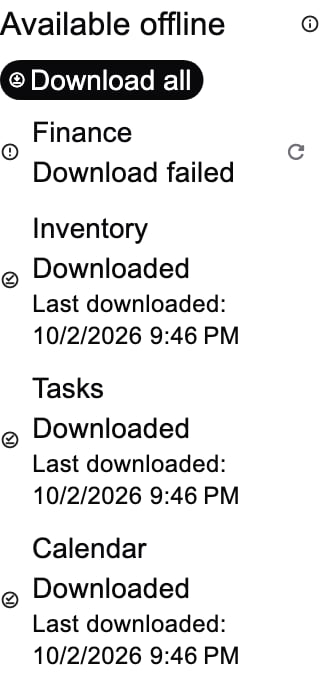
Synthetic render evidence for the offline status and targeted retry surface:
Floating navigation and compact Profile
The first floating navigation tap opens its destination. Reselecting the active destination scrolls its content to the top. Reselecting again resets its top section to the default; if already at the top, reset happens immediately. Rapid third taps during scrolling must also reset. Notifications returns to Inbox and Profile to Overview within at most three taps; scrolling manually restarts the sequence. Apps resets to Grid, Finance taxonomy to Categories, and Calendar to Three days on phones or Week on tablets. Notes returns to Inbox and Assistant to Chat through their existing guarded handlers. Time Tracker sections remain separate routed destinations. Home defaults to Home; its second tab, Personal Agenda, uses only the signed-in user’s personal membership, with no shared fallback or global scope change. Agenda resolves user, personal workspace, then device timezone and reloads after preference changes; Home retains its mounted dashboard state across tabs. Agenda retains cached events during retry and offers read-only details; Calendar remains the editing surface. Apps defaults to Grid before List. Shared search replaces the top navbar; empty submission dismisses and unfocuses. IME visibility and hardware search focus animate the whole dock and its actions out together; route changes clear focus. Workspace visibility has a subtle icon, a named tooltip, and a 44-pixel target. Regression coverage:personal_agenda_test.dart, personal_agenda_scope_test.dart, shell_keyboard_chrome_test.dart,
and apps_search_submit_test.dart. Apps opens with one tap and keeps its picker on long press.
Profile uses the shell title for Overview and Timeline, with no duplicate
body heading. Place the day-trail action before the rightmost Overview/Timeline
switch, including compact/overflow layouts. Identity and metric layouts adapt to
available width and text scale; avoid nested bordered panels and fixed three-column
cards on small screens. Timeline mounts activity rows lazily and keeps transient
provider failures in a bounded toast, without a persistent retry/status row.
Preserve privacy and do not announce a partial response as complete history. These are defaults
for the mobile Profile and comparable shell section switches; semantic borders
for unsynchronized drafts and destructive confirmation dialogs remain intentional.
Regression evidence: shell_dock_reselection_checks.dart,
shell_chrome_actions_test.dart, profile_overview_shell_test.dart,
profile_timeline_section_test.dart, and profile_timeline_races_test.dart.
Synthetic Profile renders use placeholder identity and activity data:
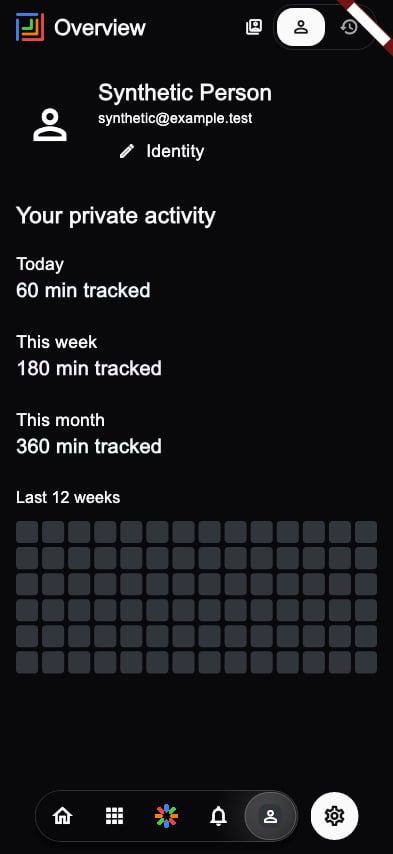
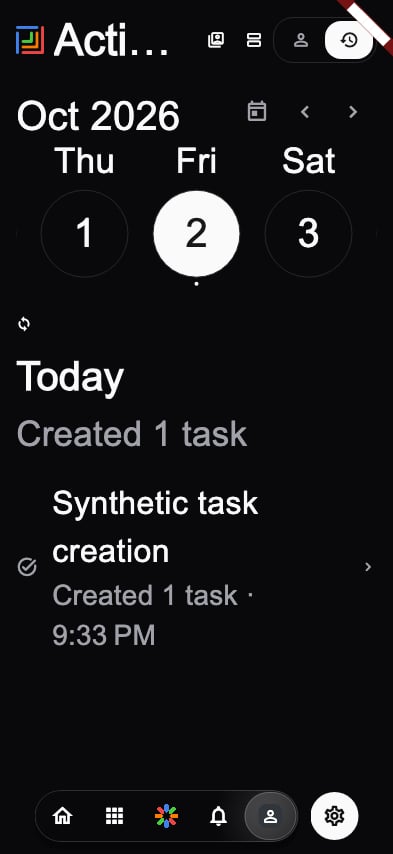
Profile activity privacy
The Profile timeline shows the signed-in user’s task creations, transaction creations, and notes from the verified personal workspace. Calendar rows are workspace events, shown only withmanage_calendar permission. The API first
checks actor membership and Calendar permission before its audited Calendar read;
missing permission omits that source, while lookup failures mark the result partial.
Finance keeps its permission-aware RPC. Calendar titles are not returned.
Overview is the default view and has no edit shortcut. Profile editing and full
banner controls live in consolidated account settings. Avatar/banner uploads are
optimized off the UI isolate: input is bounded to 20 MiB/40 MP, orientation is
applied, and JPEG output is limited to 1024/2048 pixels and the existing 2/5 MiB
bucket ceilings. Animated images become a static first frame; re-encoding strips
source metadata. Banner tickets reserve the existing actor-derived upload budget;
failed tickets retain their reservation. Only public first-party actor-owned
avatars/banners enter the scoped disk cache. Signed, private and foreign URLs do
not. Account changes fence asynchronous profile loads and media dispatch.
Timeline groups records by local day, links to native views, and reveals days near
the bottom, including an initially short viewport. Day headings and activity rows
are mounted lazily, with row extents adapted to the effective text scale. Further API pages contain at
most 200 rows per source, with a pinned upper time boundary and a maximum of 1000
pages per browsing session. Offset continuation can omit or repeat records during
concurrent inserts/deletes; client deduplication does not guarantee snapshot
isolation. Refresh starts a new session. A partial or failed page pauses automatic
continuation and keeps loaded rows. No persistent warning, retry row or completion
footer occupies the Timeline; a failure notice automatically dismisses after five
seconds. A capped or partial result must not claim an empty complete history.
The loaded snapshot is encrypted and actor/personal-workspace scoped, shown before
revalidation. Successful pages persist merged, deduplicated history. Partial
refreshes retain stored rows from failed providers while replacing successful
providers, with truthful partial flags; they do not retain newly permission-denied
Calendar rows. Older partial responses without source metadata retain their
stored rows as explicitly incomplete. Missing, ambiguous or unverified
personal membership fails closed; neither Overview nor Timeline follows the
selected team or tracked-time sharing preference. An unreadable local snapshot
does not block refresh. Regression coverage includes
profile_timeline_incremental_test.dart, profile_timeline_races_test.dart,
profile_media_optimization_test.dart, profile_media_image_test.dart, and the
first-class mobile-activity/banner-ticket API tests.
Profile Overview and Timeline show personal data only and expose no team-sharing
controls or opt-in team aggregates. Nothing is shared by default. Existing team
sharing consent still gates workspace-scoped tracked-time totals and daily
activity, excluding raw session titles, email addresses, personal aggregates and
other workspaces. Revoking consent or membership blocks future shared reads.
The API uses the existing owner-scoped user_workspace_configs preference
PROFILE_ACTIVITY_VISIBILITY=workspace; missing or other values mean private.
It checks viewer membership before privileged reads and subject membership and
consent before and after aggregation. Shared activity is never stored in the
mobile persistent cache. Test private defaults, confirmation cancellation,
revocation, former members, and account/workspace changes before release.
Assistant and task verification recovery
A task write returning HTTP 403 withX-Abuse-Challenge: turnstile requires
verification, not broader workspace permissions. Mobile opens the existing
security dialog and retries the same request once using the returned token.
Cancellation sends no retry; an account change aborts the request. Other 403
responses remain permission failures. Never bypass the server authorization or
abuse check to repair this flow. Log status and error codes, not response bodies
or verification tokens.
Every satellite enforcing this challenge needs its own production
TURNSTILE_SECRET_KEY configuration matching the mobile TURNSTILE_SITE_KEY.
The mobile release vault also supplies TURNSTILE_BASE_URL. A successful client
challenge followed by another 403 requires checking the server challenge audit:
not_configured means the satellite secret is missing. Configure the existing
matching secret through the provider vault and redeploy the current production
source; never disable verification. Check names and readiness without logging
secret values.
Assistant credits must load independently of optional task, Calendar, soul, and
model-catalog insights. Calendar insights use the authenticated workspace
/api/v1/workspaces/:wsId/calendar/events gateway. A failed credit read offers a
retry in the credit-source sheet rather than displaying a fabricated Free tier.
Chat errors remain visible after stream completion, with the user’s message
retained for retry. Older Assistant UUIDs are not native Chat conversation IDs:
the specific Conversation is not an AI chat settings rejection must use the
legacy Assistant stream through the shared authenticated API client, including
challenge and refresh handling. Other malformed-settings errors stay errors. Read-only ai-agent-thread- mirrors belong in Chat, not Mira’s
editable history. Do not restore them as Assistant conversations or send their
synthetic identifiers to Live’s UUID-backed chat endpoint; Live starts a new
owned session when no resumable UUID is available.
Live initializes PCM playback before starting microphone capture on iOS. Its
serialized audio queue preserves chunk order and discards queued chunks when
playback is interrupted or disposed. The vendored PCM plugin preserves existing
AVAudioSession category options when the category is already correct; resetting
those options can disturb an active microphone route. Native microphone failures
are recoverable UI states. A simulator without a valid input format cannot prove
physical-device audio quality; verify recording, playback, interruption, and
headset reconnection on hardware before claiming that a reported device crash or
stutter is resolved.
Apps search submission
Submitting a nonempty Apps query with exactly one current matching app clears the field, closes search mode, and opens that app. Zero or multiple matches keep the query and results visible while unfocusing the keyboard. Empty queries close search mode. Submission uses the same current localized results as the hub, and repeated submissions cannot launch the app twice. Apps discovery retains its case-insensitive substring matching over the localized label, description, and module ID; this submission change adds no plural stemming. A queued selection is canceled if workspace, account, experiment, access, or locale inputs change after its match was resolved and before navigation.Workspace picker search selection
The mobile current-workspace and launch-default pickers keep search text and filtered results when the search field loses focus, including keyboard dismissal before a result tap completes. Clearing search is an explicit action. Each result uses its workspace ID for identity and selects its rendered workspace object, including after sorting, duplicate display names, and list refreshes. This rule applies to the sheet opened from the navbar, dashboard and Workspace Settings; it does not change membership discovery, permissions, or default persistence.Private Hidden workspace recovery
The compact Settings root places Hidden workspaces immediately after Workspace, before You. Its restore editor is account-scoped and available for guests, without an active workspace, and when every workspace is Hidden. Opening, searching and dismissing perform no preference write; explicit Restore changes only that user’s preference and does not select a scope or change its default. The all-Hidden workspace selection screen also offers recovery. See Hidden workspaces for canonical membership separation, actor-scoped caching and web/satellite selector behavior. Regression coverage is insettings_hidden_recovery_checks.dart (actual Settings/Shell root, one mini
navigation item, guest/no-active/all-Hidden, Back and 320px/2× text) and
workspace_visibility_test.dart (rollback, logout/account replacement, deferred
module flags and explicit deep links before preference discovery).
Shared navbar text scaling
The compact mobile navbar keeps its normal size at the default text scale. At larger accessibility text sizes, its height grows to fit the title line without shrinking that text. The floating content inset grows with the same measurement, while icon switches stay compact in the top navbar. Read-only titles normally use one line with an ellipsis and retain their full accessibility label. When ellipsis would remove every title character, a clipped prefix remains visible. Editable titles scroll horizontally under a fade instead of ellipsizing. Mounted Assistant chat/live coverage confirms that its existing inner Row allows its scaled title to paint within the taller outer navbar: 56px at 2× and 84px at 3×. That inner Row does not clip the text vertically. Horizontal space remains limited by the compact mode controls; narrow layouts can show only a clipped prefix rather than the complete title. Its full semantics label remains available. The shared-navbar regression verifies actual ink in the first title glyph for both modes at both widths and all three text scales. Scroll threshold geometry is cached and refreshed for theme, text-scale and safe-area changes; drag notifications do not perform title layout. Title measurements follow inherited text style and platform bold, line-height, letter-spacing and word-spacing overrides. The painted-prefix check selects a complete first grapheme, so emoji and joined characters retain ordinary ellipsis when they fit. Full title semantics remain available in either overflow mode.Profile Timeline date navigation
Overview and Timeline read only the signed-in account’s verified personal membership, even with a team selected. Missing or ambiguous personal memberships, authentication mismatch and account transitions clear data and make no fallback request. Cached and delayed responses stay scoped; opening records selects their personal workspace. Timeline has one primary scroll: optional week controls scroll with activity, rather than pinning a second header. Closed shell-controlled dates add no month row or empty refresh slot. Header clearance is inside the scroll; it leaves the viewport as the shell hides. Returned days and further provider pages append near the bottom, including a short viewport, with stable item positions and type/id deduplication. Date navigation expands returned days as needed. No completion label implies that the user’s complete history has been loaded. Partial responses retain existing rows and pause continuation; refresh starts a new paging session. Calendar attribution, device-local grouping, reduced motion and DST stay intact. Home’s personal calendar tab is titled Agenda in English and Lịch trình in Vietnamese. Its header clearance scrolls away; all-day progress is clipped by the card’s exact edge. Regression targets:profile_personal_scope_test.dart,
profile_timeline_incremental_test.dart, existing Timeline race/date tests,
personal_agenda_test.dart and agenda_view_test.dart; device proof is separate.
The week strip reveals the selected date when opened or when the selected date,
week, width or text scale changes; ordinary snapshot rebuilds retain the user’s
manual horizontal scroll. Browsing another week begins at its first day when
that week does not contain the selection. Calendar-day comparison uses UTC date
carriers rather than elapsed DST-length days. Unknown cold failures and empty
partial/capped snapshots show unavailable/partial state, never a confirmed
absence of activity. A successful complete empty response can confirm the
empty state. Actual padded Profile/Shell regressions cover the single activity
viewport, selected-date bounds and existing compact navbar at 320px/3×.
Opening date controls before the first activity response does not lock the
default date: the newest returned day is revealed unless the user explicitly
chooses a date. Empty stored snapshots stay provisional while revalidation is
pending, using the fixed skeleton viewport rather than announcing absence.
The section owns one bounded failure toast per failure streak; the embedded
browser does not add a persistent provider-status banner, refresh icon, retry row,
or completion label. Every entry shows the last authorized in-memory snapshot
immediately and revalidates in the background, including snapshots marked fresh.
Temporary network failures and verification challenges retain those rows;
definitive authentication or permission denial clears both visible rows and the
stored snapshot. A scoped secure-storage revocation marker is written before
cache removal, so cache initialization or deletion failure cannot reopen that
history after a restart. Until a new repository checks that marker, synchronous
peek stays empty; unreadable markers fail closed. A successful actor-fenced refresh
confirms a new snapshot was persisted before clearing the marker. If that write
fails, fresh online rows may display but the stored denied history remains blocked. If both marker persistence and
cache deletion fail, the client reports TIMELINE_CACHE_REVOCATION_FAILED and
blocks the current session; durable erasure cannot be guaranteed during combined
storage failure. Verification challenges, including MFA_REQUIRED, preserve
history and continuation. Cold skeletons announce Loading as a live region without
adding a visible refresh control. An account or personal-workspace change fences
delayed responses.
These defaults apply to mobile Profile Timeline; partial provider failures retain
only previously loaded rows from the failed sources and pause provider continuation
until a successful complete refresh. Viewport-near-end loading still expands
returned days and complete provider pages automatically, including short lists.
Regression evidence: profile_timeline_repository_test.dart,
profile_timeline_races_test.dart, profile_timeline_revocation_test.dart,
profile_timeline_browser_test.dart, and profile_timeline_paging_test.dart.
Mounted Profile regressions locate the lazy activity section by its rendered
position and wait within a bounded interval for fetched statistics. Fixed pixel
scroll distances depend on the test font and can leave the section unmounted at
large text sizes. Restore a hidden shell header with reverse user scrolling
before tapping its selector; resetting content offset alone does not reveal
the header. Validate both the default CI font and the optional capture font.
Offline settings and stored-data inventory
Mobile Settings groups Preferences into Appearance & language, Calendar & timezone, Notifications & interaction, and App preferences. Downloads, cache limits, cache removal, and unsynchronized changes belong to a dedicated Offline section. Account, workspace, experiments, and help retain their existing access rules. Each stored namespace expands to a local-only item list, searchable by name or ID. Rows render lazily in a bounded viewport; search covers the complete scoped local collection and survives unrelated coordinator updates. Namespace source-content identity triggers rereads only when that namespace changes. Payload sizing is deferred until visible item details open and is memoized for that content version. Item details show its stored identity, logical payload bytes and last fetch time; these persisted rows exclude queued-only edits. Account/workspace changes and loss of module access immediately remove the list and its expanded details. Regression coverage:offline_module_page_test.dart verifies item search, scoped
isolation and permission redaction. Offline module detail pages offer stored-collection search, per-namespace
inventory, and the applicable existing Finance, Tasks, or Calendar preference.
Inventory has download, refresh, and eviction controls; it does not invent a new
module preference.
Available-item counts deduplicate persisted replica IDs within each namespace
across overlapping pages and snapshots. Ordinary successful reads count as well
as explicit downloads. Valid retained expired snapshots remain counted as
available offline, with expiry reported separately from freshness. Counts never
sum unrelated namespaces into a supposedly complete catalog. Server-reported query totals are displayed only when retained pages agree on
the query and total; otherwise expected totals are unknown. These totals never
establish complete download coverage. Pending-write coverage of server totals
is unknown; the pending count is shown separately. Sizes measure logical encrypted-store payloads
including snapshot and replica copies, excluding filesystem overhead. Expected
download sizes and transferred network bytes are unknown.
Module data is scoped to the selected account and workspace. Inventory details
require current workspace access, and unavailable modules show no stored-data
inventory. Removing a module’s data clears only its scoped namespace resources,
preserving every queued write and other module/account/workspace snapshot. Cache
removal in Offline preferences also uses the selected scope; the cache quota
remains device-wide and can be changed by a signed-in user without a selected
workspace. Scoped usage and clearing require a workspace; no cross-workspace
usage is shown when none is selected. Scope changes cancel open cache preference
sheets. Eviction and quota controls disable reactively while an explicit download
is running. Stored corrupt JSON payloads still count toward storage and can be
cleared, while they never count as available offline items.
Pause cancels subsequent download steps. Resume retries unfinished modules while
skipping modules verified ready in the current session. It restarts a module’s
supported collection download; it does not promise byte-level continuation.
Across launches, retained timestamps are historical evidence and never alone
establish readiness. Cache removals during a download or its final retention
checks are retained until completion: affected products return to queued status,
while unrelated products can finish. Successful product downloads supersede their own reconciliation removals;
final retention checks and later removals still revoke readiness. The next
explicit retry must verify removed dependencies again. Cache removal notifications retain only scoped
identity with an event-only opaque key digest, never the removed response payload
or literal query/search parameters. Persisted cache keys remain unchanged. A corrupt stored response is treated
as missing and still attempts network revalidation; account switches and explicit
cache clearing continue to fence that response. Inventory product details permit
pending-item fallback only for typed transport failures. Invalid response bodies,
session failures, and unknown status-zero errors surface instead.
Regression coverage: offline_preparation_coordinator_test.dart,
cache_revalidation_corruption_test.dart, and inventory_repository_test.dart. Explicit downloads continue to use the existing bounded
Finance, Inventory, Tasks, and Calendar collections; neither these pages nor a
Ready label promise all server data or every attachment.
Timezone reads and writes both pin their authenticated account. Automatic timezone
preferences persist even if native timezone lookup fails; unresolved effective
timezone and actual load/save errors remain visible, with wrapping text and retry.
These settings use the production mobile-calendar gateway and existing Bearer
renewal/retry behavior; no backend route or production state changes are included.
Regression evidence: test/core/cache/offline_cache_inventory_test.dart,
test/core/cache/offline_preparation_coordinator_test.dart,
test/features/settings/cubit/timezone_settings_cubit_test.dart, and
test/data/repositories/timezone_settings_http_contract_test.dart under
apps/mobile. Widget tests are source-level evidence; native airplane-mode and
installed-client behavior require a new exact-source CI artifact and separate
runtime verification.
Native Assistant prompt and navigation
On the mobile Assistant text-chat surface, opening the prompt collapses the actual floating shell navigation into the right-hand hamburger toggle. The single-row prompt occupies the remaining width: plus menu, chat field, and microphone action. Text or attachments replace the microphone with Send. The plus menu holds attachment previews and removal, model selection, thinking mode, and the credit-source sheet, including its existing balance/error/retry behavior. Model selection remains constrained by the active credit source’s allowlist. The hamburger expands the existing navigation above the prompt and dismisses the keyboard. Closing the prompt restores normal navigation. Android back first collapses expanded navigation, then closes the prompt. Tab changes hide the prompt while retaining its unsent text and attachments; workspace changes and the existing account session boundary reset the draft to prevent scope leakage. The legacy fullscreen button is removed. Explicit Live entry, voice recording, camera controls, permissions, and session persistence keep their existing rules. Other shell screens retain their shared keyboard-hide navigation policy. Regression coverage:assistant_composer_dock_test.dart checks the 320px layout,
large text, single-row actions, attachment removal, restoring state and blank
submission; assistant_composer_options_test.dart checks adaptive model selection
and credit allowlists; assistant_chrome_cubit_test.dart covers presentation reset;
shell_assistant_composer_test.dart checks actual dock collapse, restoration,
back handling, mounted shell continuity, retained tab drafts and workspace reset
across the active floating dock at phone/tablet/desktop widths (the legacy compact
footer is disabled). assistant_composer_geometry_test.dart checks the rendered
scroll action clears the composer with safe-area insets, large text and keyboard
visibility; both exclude physical bottom padding while the keyboard is visible.
Widget coverage does not establish
physical-device microphone, provider, camera, or production behavior.
Native onboarding and brand introduction
The first-run and replay guide introduces Tuturuuu and Mira alongside Tasks, Calendar, Finance, and Inventory. Native gradient surfaces and brand assets provide visual context; tool labels describe existing surfaces rather than enabling access or promising automatic actions. Role and goal selection remain optional local recommendation preferences, not permissions or subscription changes. The four-page guide keeps the existing completion flag, role and goal preferences, login destination, and replay return behavior. Skip completes the same guide. Content scrolls independently of its primary action, including on small screens and with enlarged text. Light and dark themes retain solid readable controls. Reduced-motion settings remove animated page, progress, and background transitions; there is no continuous animation. This introduction is a full-screen flow outside the consolidated shell and does not add a nested shell navbar. Regression evidence:apps/mobile/test/features/onboarding/onboarding_page_test.dart
covers progression, preferences, skip, replay, and compact enlarged-text layouts.
Cache recovery and explicit quote refresh
Mobile cache publication journals retain prior snapshots for stale-while-revalidate rollback. Eviction and authoritative completed-download reconciliation instead persist a scoped deletion intent without copying removed payloads or replica rows. After interruption, recovery completes those deletions and preserves unrelated scopes and pending writes; it does not restore evicted or obsolete data. Journal completion batches the entity-log flush after affected snapshot/outbox flushes. Regression evidence:cache_store_publication_test.dart.
Inventory manual season-quote refresh waits for an automatic refresh, then performs
an unthrottled fresh request in the same actor/workspace/period scope. Other
concurrent callers still coalesce; a scope change cancels the queued refresh.
Regression evidence: season_pricing_controller_test.dart.
Challenges and shared cached reads
Shared mobile JSON object/list reads retain the last encrypted authorized snapshot when revalidation requiresMFA_REQUIRED or a typed verification challenge.
The request still rejects with the challenge, allowing the owning screen to request
verification; retained cache does not authorize a write or bypass server checks.
Rate limits and server availability failures likewise leave the stored snapshot
intact. Definitive same-account 401/403 responses erase the snapshot and replica
projection durably. Purge admission rechecks the request actor, so a departed
account’s delayed denial cannot erase a newer authorized publication.
Regression evidence: offline_read_through_access_test.dart verifies both payload
shapes, reopening encrypted storage after retention/denial, and a delayed denial
across an account change.
Snapshot invalidation and private search
A concurrent tag invalidation rejects the new response but retains the previous authorized snapshot as stale, including its replica rows. Account/workspace clears and actor changes still erase it. Offline search patterns are compiled per call once per Finance/Inventory collection scan and retained only by that caller; no application-owned global raw query cache survives logout. A queued sale-period assignment retains its period ID when period metadata is evicted, with unknown metadata distinct from an explicit null removal. Regression coverage:cache_store_publication_test.dart, local_search_test.dart,
and inventory_sale_period_projection_test.dart.
Finance replica merging treats a newer server [CONFIDENTIAL] description as an
authorization barrier regardless of detail authority: older plaintext cannot
appear in offline lists/search or merged JSON. A newer authorized response may
restore that field even from a list after an older redacted detail. Amount and
category permission nulls (with their server confidentiality flags) likewise yield
to newer explicit authorized values, while ordinary detail clears and sparse-field
authority remain unchanged. Newer explicit null still clears the field. This projection rule is covered
by cache_replica_policy_test.dart and finance_inventory_offline_test.dart.
Direct transaction detail refresh also routes transport fallback through merged
replica rows rather than an older raw detail snapshot, even during awaited
revalidation. Authentication/MFA errors still propagate. Other read-through
callers retain their existing awaited transport fallback default. Covered by
finance_review_regressions_test.dart.
Transaction detail fallback reads merged replicas after the failed request or
offline connectivity decision, rather than returning rows captured before it.
A redaction arriving while a request waits therefore takes effect immediately;
the captured actor is checked after the fallback read. Concurrency regressions
live in finance_review_regressions_test.dart.
Pending Mail and workspace-secret reads fall back only for typed transport
failures; local response/session errors remain visible even with queued edits.
Tag invalidation advances stored resource revisions as well as active flights,
so completed futures in the same refresh cycle cannot replay a pre-mutation
response. Queued manual season refresh is also bound to the generation, preventing
A-to-B-to-A scope changes from resuming an old continuation. Regression coverage:
mail_repository_test.dart, workspace_secrets_repository_test.dart,
cache_revalidation_test.dart, and season_pricing_controller_test.dart.
CMS actor-bound repository reads and edits
CMS repositories created for a signed-in actor bind cached summary, collection, and entry reads to that actor. Pending edits are overlaid only for their owner; an account change during queue access rejects the old read. CMS writes carry the same actor into offline admission, and invalidation targets that actor’s workspace cache. Unbound legacy callers resolve the current actor for pending overlays and never display anonymous or another account’s pending edits. This foundation does not grant CMS permissions or replace API authorization. Regression evidence:cms_actor_scope_test.dart exercises collection and entry
overlays, delayed queue completion after account switching, and obsolete reads
and writes. The native CMS screen and device verification remain separate work.
CMS native library and editing
The mobile CMS surface owns one signed-in actor and workspace. Its library uses lazy rows, collection/status filters, and local search published into the single shell dock. Search covers the loaded CMS collection/entry response; it does not claim server pagination or full-text search beyond that response. Re-entry publishes stored scoped content and awaits background revalidation; explicit refresh waits for the current cycle. Same-actor temporary failures and MFA challenges retain content, while definitive denial clears it. Switching actor or workspace discards the previous surface and closes its owned editing routes. Editors keep drafts and inline errors until a save succeeds, permitting explicit retry without silently replaying an uncertain write. Regression coverage:cms_workspace_test.dart exercises lazy 500-row rendering,
shared dock search, stale-scope responses, denied versus challenged refreshes,
retained failed-save drafts, and actor-owned editor dismissal beneath an
unrelated modal. Cleanup schedules a frame even when the covered route is
settled; it removes that editor alone and preserves the covering modal.
Timer also remounts its native host for each authentication transition, including batched logout and login to the same account. A preference read owned by the disposed host cannot prevent the new host from loading or resume its previous request. The actual-host deferred preference regression covers this liveness boundary independently of Timer load-publication fences.
Native Chat account lifetime
The native Chat root owns a new host and cubit for each signed-in actor, even when the workspace ID stays unchanged. An actor-transition generation also replaces the host when logout and same-account login occur before a frame renders. Search, selected conversations, drafts, and retained messages belong to that host. Closing invalidates asynchronous callbacks before subscription cancellation finishes; actor and cache-resource lifetime checks also fence delayed results. This preserves the existing shared shell dock and API-backed workspace chat behavior. The actual host account-switch and delayed-cancellation regressions are inchat_actor_lifetime_test.dart.
Chat rejects retained-cubit API dispatch after its actor lifetime ends. A send waiting for previous stream cancellation rechecks actor, workspace and selected conversation before starting a new request; stale conversation creation results do not trigger selection reads or return a navigable result. Already dispatched server writes are not cancelled by this client boundary. Deferred cancellation and creation regressions cover these rules.
Delivered inbox identity foundation
Standard persisted notification pushes carry a versionedinboxIdentity capsule
from the recipient account, actual inbox workspace column (explicit null for
personal), and notification row ID. Android receives the same full identity as
its notification tag. This is an encoded identity, not encryption or an action
authorization token. Display/navigation metadata cannot change its owner or scope;
a personal inbox invite can still navigate to a shared workspace.
Custom/MFA pushes strip the reserved inboxIdentity data field and receive no
owned inbox tag; other custom metadata remains unchanged. Legacy rows
without valid recipient/workspace/notification identity remain unqualified; they
must not be bulk dismissed by guessing their owner. Existing Mail navigation is
preserved without promoting its legacy metadata into trusted inbox identity.
push-inbox-identity.test.ts covers the actual payload constructor and outgoing
transport with a fake Firebase client, including same-ID foreign scopes,
personal/navigation separation and legacy/custom exclusions.
This packet provides identity only. Mobile delivered-only removal and read-action
integration remain separate; it does not clear an OS tray or cancel future task
and calendar reminders. Source tests are not device proof. A future delivery
receipt must record the actual TestFlight version/build and verify foreground
and background single/all-read dismissal while foreign scopes, later arrivals,
and pending reminders survive. The reported 0.23.4 build number remains unknown.
Delivered-only native bridge
The mobile bridge binds to the current account session, snapshots delivered inbox notifications, and removes only still-matching captured deliveries. A null inbox workspace selector means all inbox scopes available to that actor, matching the existing bulk-read API; an explicit workspace selector is narrower. Missing or malformed ownership capsules remain untouched. Foreground and data-only background local notifications preserve the same capsule as standard remote pushes. Android uses app-owned active notification tag/ID/post time; iOS uses delivered request identifier/delivery date and remote or local capsule metadata. Account session changes invalidate outstanding snapshots, including logout/relogin ABA. Enumeration beyond 512 delivered records or eight retained snapshots fails closed. A discard operation releases a snapshot without removing notifications. Neither platform bridge calls pending-notification or alarm cancellation APIs. The native platforms offer no atomic timestamp-conditioned removal. Rechecking captured identity and delivery time protects replacements already visible during the recheck, but a replacement racing between recheck and OS removal remains a platform limitation. Returned counts mean matched removal requests submitted, not verified tray disappearance. Read-action integration is a separate packet; this bridge alone does not dismiss notifications when marking them read. Dart MethodChannel tests cover actor/session ABA, held callbacks, strict receipts, scope selection, malformed capsules and metadata round trips using fake native transport. Native compilation and actual TestFlight foreground/background tray behavior remain separate required evidence. Future scheduled task/calendar reminders must survive single/all-read cleanup. Record the actual version and build number for device feedback; source tests do not identify a delivered build. Push-service session start/stop/dispose also invalidate a sticky lifetime epoch. A start held in native binding, initialization, token lookup or device-ID lookup cannot continue into registration or pending-navigation dispatch after departure, including a same-account logout/relogin. The registration helper rechecks its captured lifetime before writing, and disposal closes initialization/navigation admission. Already dispatched transport writes cannot be undone by this boundary.push_service_session_lifetime_test.dart exercises actual service methods and the
actual registration helper with injected platform/token/device transport.
Calendar viewport and adjacent timed-card geometry
Mobile Day, Three-day and Week timelines keep isolated back-to-back events at full available width. Half-open timestamp components identify genuine overlap; an isolated card’s readable minimum is capped at the next disjoint start, and paint and column assignment use that same extent. Tiny capped cards clip their visual content, retain full title/time button semantics and do not extend their hit area into the next event. Genuine simultaneous/transitive overlap clusters retain readable minimum heights and physical conflict columns; a timestamp- disjoint successor can still share columns with that readable cluster. Shared Day, Three-day and Week strips size spans intersecting the viewport. Chip insets and offscreen events reserve no rows or expand control. Row and control heights transition together over 180ms and retarget from their current geometry. Whole rows and controls appear only when they fit, preserving scaled text and viewport-clamped labels. The header stays fixed; the timed grid moves with the strip while keeping its minute offset. Reduced motion places geometry immediately, including interruptions. A scope change resets the transition. Data refreshes retain current authorized content and date anchors. The all-day scroller retains its identity and attaches at the grid offset. Recentring updates dates and horizontal offsets before paint; scoped civil-date keys retain day cells. Pixel scroll rebuilds only the strip. Initial time positioning, week-start and date reselect keep their existing behavior.calendar_three_day_geometry_test.dart and calendar_all_day_transition_test.dart
cover painted drags, data updates, retargets, text scale, themes, taps and scopes.
Existing overlap tests remain. CI and installed-device checks remain separate;
widget geometry does not establish TestFlight identity or frame-time impact.
Reading inbox notifications and the system tray
Mobile reads capture a bounded snapshot of actual delivered notifications before accepting the read. Single reads match the current actor and notification ID; workspace bulk reads match that workspace, while the personal/all-workspaces inbox follows the existing API’s actor-wide bulk scope. This is independent of the visible 20-row feed. Unread transitions never dismiss notifications. Only the captured, still-current session can request delivered-item removal. Mounted read controls suppress stale cleanup and refresh after account/workspace changes or route disposal. The opened-item helper follows its actor-bound ID across intentional navigation and rechecks that actor/native lifetime before publishing a refresh; logout/relogin invalidates both paths. Captured native tags/identifiers and delivery timestamps retain later arrivals and replacements. Pending scheduled reminders are never cancelled. Legacy deliveries without trusted identity remain untouched. A repository read may be a durable offline intent, rather than a confirmed server write. Cleanup failure preserves that acceptance and shows a localized warning; it does not retry the read. Failed reads discard their snapshot without removing OS items. A later inbox or badge refresh failure similarly preserves accepted read state and shows the localized refresh warning. Mutation refreshes consume explicit per-operation success receipts, including ordinary transport exceptions; background badge/feed helpers retain their nonthrowing behavior and badge calls still share one in-flight request. When cleanup and refresh both fail, the tray cleanup warning takes precedence; the accepted read is never resubmitted. The delivered-only bridge is applicable to native Android and iOS. Web, Windows, Linux and macOS retain actor/session fencing but do not attempt this unregistered channel or show an unavailable-cleanup warning solely for its absence. Failed binding or a missing channel on Android/iOS still produces that warning. Web capability-policy tests are not browser compilation or OS runtime evidence. The platform APIs still cannot atomically compare and delete an OS item; the previously documented last-moment replacement race remains. Regression evidence uses actual mounted inbox actions, the real Cubit and opened notification helper with fake repository/platform transports, including scope ABA and rejection controls. It is not device evidence. Delivery requires exact native CI and a recorded TestFlight version/build/source SHA: foreground and background single/bulk reads must clear only matching delivered tray items while other actors, out-of-scope workspaces, later deliveries and future reminders survive.Notification post-write feed refresh
Notification read actions invalidate any pre-write feed response before awaiting its completion, then request a fresh feed after the accepted write. Loading is not treated as a failed refresh. Queued continuations retain actor/workspace lifecycle admission. Held pre-write pagination is fenced by the same tab generation on both success and error, so it cannot restore captured unread items. An abandoned scope cannot publish or start a replacement request. Ordinary background requests coalesce without throwing; a failed fresh request reports the existing safe refresh warning and can be retried without resubmitting the accepted read. Regression coverage:notification_read_held_feed_test.dart.
Assistant Settings Above the Shell
The central Assistant settings entry and Mira quick settings open the same framed editor above the shell. Its single heading and Back action cover the underlying shell chrome; other scoped settings routes retain their existing routing. Captured account/workspace providers and sticky scope invalidation remain in force, so a held preference load cannot restore an editor after an account/workspace switch, including switching away and back. Large-text content scrolls above the frame’s Back action. Real shell regressions cover English/Vietnamese, narrow screens, large text, Back restoration, actionable switch clearance and held-load scope transitions. Both current-route cancellation and removal below an unrelated covering route are exercised, with sticky rejection after account/workspace ABA and after the held preference completes. Regression coverage:settings_assistant_shell_checks.dart, registered by
settings_compact_navigation_test.dart. This source fix
does not claim native TestFlight delivery or establish the original screenshot’s
exact installed build.
Workspace Secrets Settings Heading
The mobile workspace Secrets detail uses the shared shell title and Back action. Its summary panel retains the workspace description, icon, status counts and explicit create action without repeating the page heading. Permission checks and content/dock padding are unchanged. Actual-shell regression coverage insettings_secrets_shell_checks.dart checks English/Vietnamese, narrow layouts and
large text, including denial visibility and dock Back. This scoped correction
does not establish the cause of the reported Assistant Settings TestFlight issue.